Google’s Waze service has teamed p with Microsoft for a Halo-themed takeover where Master Chief will give you driving directions in real life to help you get to where you’re going.
You can drive with Master Chief and have your real car visualized as a Warthog, or you can ride with Escharum the Banished war chief giving you directions as your car is displayed as a Ghost.
The Halo Co-Pilot feature, as it’s called, is available in English, Spanish, French, and Portuguese. And it features what sounds like Master Chief voice actor Steve Downes himself giving you directions and saying things like, “In a half a mile, turn left.” The Halo takeover is only available for a limited time as part of the effort to promote the launch of Halo Infinite this year.
In other news, the Halo Infinite multiplayer beta has ended, but a second one is coming up and will be expanded to more Halo Insider members. Be sure to sign up for the free Halo Insider program for a chance to get in for this latest round of testing, whenever it comes up.
This year marks a big change for Konami’s long-running eFootball series–formerly known as Pro Evolution Soccer–as it transitions to a free-to-play model that will be supported by microtransactions in the years to come. So how much of the game will be free to try out? One that’s roughly the size of a demo according to the official eFootball Twitter account which answered several questions from fans this week.
“During “Early Autumn”, eFootball will have no micro-transactions–so everything will be free-to-play at launch. We will then add more content during Autumn. Exact content details to follow,” the account tweeted. “We want people to get hands-on with eFootball as soon as possible, so we will launch with a limited number of teams and modes.”
Q: Is “Early Autumn” launch basically a demo?
A: In many ways, yes. We want people to get hands-on with eFootball™ as soon as possible, so we will launch with a limited number of teams and modes. Exact details to follow.
Other details shared on eFootball include the game being developed for “consoles first” and it will include multiple features for matchmaking based on location and platform. Players on console and PC who are concerned about a graphical downgrade when matched up against mobile users won’t have to worry about diminished visuals on their more powerful platforms.
Q: Is eFootball™ just a mobile game for consoles?
A: eFootball™ is developed first for consoles but is a platform for everyone to enjoy. The game will take full advantage of the hardware capabilities of each supported device.
One of the methods in which eFootball looks to generate revenue is through a Match Pass system that will let players nominate and acquire their favorite soccer stars. The eFootball account added that “free and paid” Match Passes will be available instead of the strong lottery element that previous games made use of. Master League will also be available as premium downloadable content in the future, with more details to be shared in an upcoming announcement.
Konami’s eFootball will launch on PS4, PS5, Xbox Series X|S, Xbox One, and PC first in Autumn, and will then roll out to iOS and Android at a later date. Producer Seitaro Kimura explained last month that eFootball has become a “platform” and that Konami is ditching annual premium releases in favor of free annual updates instead. As usual, eFootball’s biggest rival will be EA’s FIFA series, which you can see more of in action with new FIFA 22 gameplay.
When it comes to gaming on a PlayStation console, be it a PS4 or PS5, it might not cross your mind to use a keyboard and mouse. However, both consoles support the traditional PC input scheme, which might make some games more comfortable to play or just easier to manage if you’re choosing to play on a desk. Better yet, the range of supported keyboards and mice is rather wide, with both the PS4 and PS5 supporting a range of wired, wireless, and Bluetooth peripherals.
Where you might not find the best support is with games, as developers must explicitly allow keyboard and mouse as an input if you want to use them natively (there are tools that let you trick consoles into thinking you’re using a controller, but we won’t be covering those here). Right now, there aren’t any PS5-only titles that support keyboard and mouse input, but many PS4 titles do (and these are playable via backwards compatibility on PS5), including but not limited to:
Final Fantasy XIV
Overwatch
Fortnite
Call of Duty: Modern Warfare
Call of Duty: Black Ops Cold War
DayZ
The Elder Scrolls Online
They Are Billions
How to use a keyboard and mouse on PS4 or PS5
Connecting your keyboard and mouse to a PlayStation console is straightforward, too. For wired peripherals, you simply plug them into a USB-A on the console. Wireless peripherals that use 2.4GHz dongles are plug-and-play too, with both the PS4 and PS5 recognizing most when the dongle is simply plugged into the console. Bluetooth devices, on the other hand, require you to pair them through the console’s setting’s menu, and this might be the most hit-or-miss option depending on how good the Bluetooth support is on your respective keyboard or mouse. They’re not the best options for gaming, anyway, given Bluetooth’s inherent latency compared to both wired and 2.4GHz connections.
Things to keep in mind
There are several caveats you should consider before making the switch to mouse and keyboard on PlayStation. For multiplayer games, like Fortnite or Overwatch, you will automatically be matched against PC players when using a keyboard and mouse, or console players who have opened matchmaking to other PC players. This is to keep things fair online, as using a keyboard and mouse can offer a significant advantage to most controller-based players. Another thing to consider is some game-specific features that might make use of unique aspects of a controller for immersion, especially in single-player titles. Although there are no PS5 games out right now with keyboard and mouse support, using these peripherals in the future will exclude you from features such as the DualSense’s adaptive triggers, which can add be very beneficial to specific games.
The best PlayStation keyboards and mice
If you are looking to make a switch in your PlayStation setup, you have loads of options to choose from. Below, we’ve rounded up some great keyboard-and-mouse bundles that offer great value, as well as separate keyboards and mice that offer great support for all their features without needing to interface with PC software that won’t be available on a console (software for controlling RBG and macros, for example). There are also lapboards you can buy that make it much easier to game with a mouse and keyboard from the comfort of your couch, offering the best of both worlds if you’re willing to pay the premium.
If you’re planning to play with a mouse and keyboard but not give up the comfort of your couch, then you’re going to want a lapboard. Razer makes probably the best one out there in the Razer Turret. Don’t be put off by the Xbox branding–this wireless keyboard-and-mouse combo works just fine on PlayStation consoles with its 2.4GHz dongle. The price is a little steep at $250, but this is an all-in-one package with a tenkeyless mechanical keyboard, a retractable, magnetic mousepad, and a mouse with a profile very similar to Razer’s DeathAdder. It comes with a docking station for charging and very comfortable padding on the bottom for long gaming sessions, making it an ideal fit if a controller just isn’t doing it for you anymore.
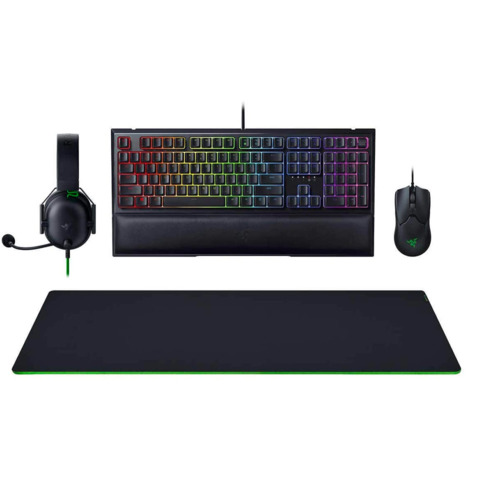
Another option if you’re interested in what Razer has to offer is the company’s All-Star Gaming Bundle, which includes a keyboard, mouse, and headset again. This time you get the Razer Ornata V2 RGB, which is a membrane keyboard with some slim clicking elements to replicate the feel of a true mechanical keyboard. The Razer Viper ambidextrous mouse is included along with the excellent Blackshark V2, which is one of the most comfortable headsets around. You’ll also get a large Gigantus V2 XXL mousepad, which might be perfect if you’re planning to play PlayStation on a desk.
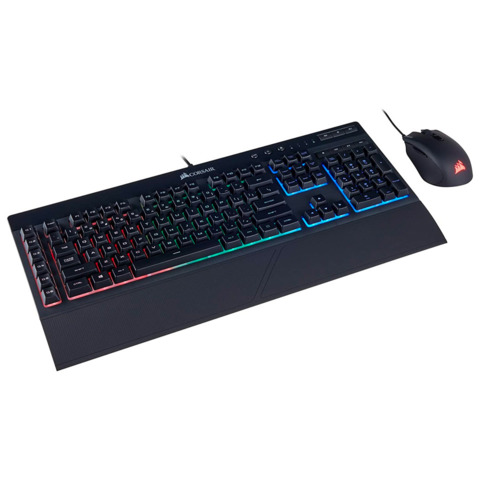
Corsair offers a great combo deal on the K55 keyboard with the Harpoon RGB gaming mouse, both in wired variants. The K55 is a membrane keyboard with three-zone lighting, which makes it a little less robust in the RGB department. But with a detachable wrist rest and media controls, it has everything you need for good, comfortable gaming sessions. The Harpoon mouse is also a great choice, with up to 60 hours of playtime on a charge, six programmable buttons, a lightweight 99g build, and a 6000 DPI sensor for great tracking. At this price, you’ll struggle to find a better bundle.
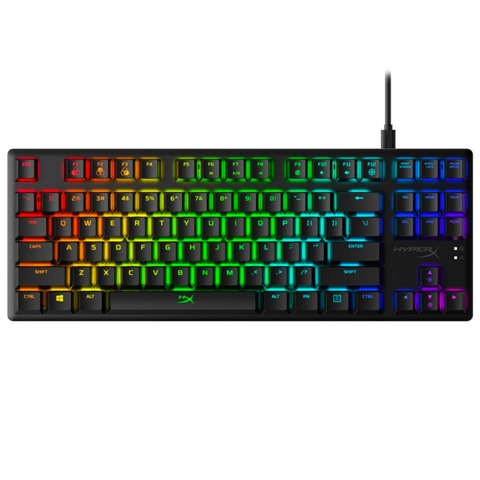
Since pretty much every wired keyboard will work with both PS4 and PS5, you have a large range of great gaming keyboards to choose from. But many of these require PC software to get the best out of them, which makes the HyperX Alloy Origins Core a great compromise. It features lovely mechanical switches, including HyperX’s own tactile aqua switches, as well as on-board memory that allows you to flick through programable profiles without needing to be linked to proprietary software. This means you can set up three different lighting or macro profiles on a PC and have those transfer over for your use on PlayStation. At $90, it’s also a great price for a solid keyboard, although you will need to be fine with a tenkeyless design.
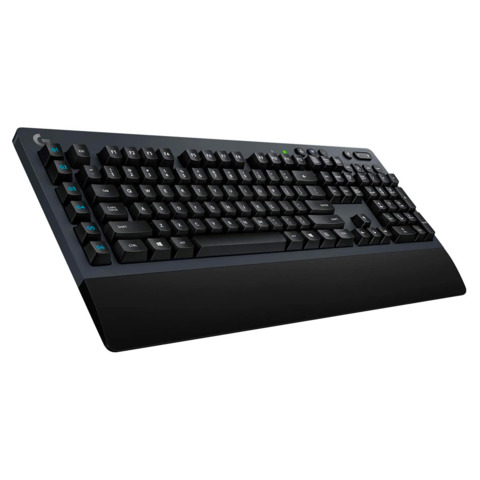
On the front of great wireless keyboard options, the Logitech G613 ticks many of the boxes. Firstly, it’s wireless with two connection options, both 2.4GHz and Bluetooth, which gives you flexibility when it comes to using it for both PlayStation gaming and work. It features Logitech’s Romer-G mechanical switches, which are somewhere between a traditional tactile and clicky switch. There’s no backlighting to speak of, but you do get a solid (albeit plastic) build that will stand the test of time and a built-in wrist rest for comfort. Two AA batteries are all you’ll need to get going–according to Logitech, that should provide around 18 months of use.
The Razer DeathAdder is as timeless as it gets when it comes to gaming mice, with Razer’s most popular design having endured for over a decade. This latest version brings several improvements, including a new sensor, faster mechanical switch, eight programmable buttons, and Razer’s SpeedFlex cable that will make it feel wireless while offering the response times of being wired. It’s as low fuss as a reliable gaming mouse can get, making it a perfect choice for long play sessions on PlayStation.
If you aren’t looking to spend close to $100 for just a mouse and don’t want any wires, then this budget Corsair wireless gaming mouse might be perfect. It uses a 2.4GHz dongle for strong and seamless wireless connections, weighs just 96g, and works off a single AA battery that is rated to last over 135 hours of playtime. It also features Bluetooth connectivity, so when latency isn’t an issue, you could even use the Katar Pro Wireless for work on the go or at your desktop.
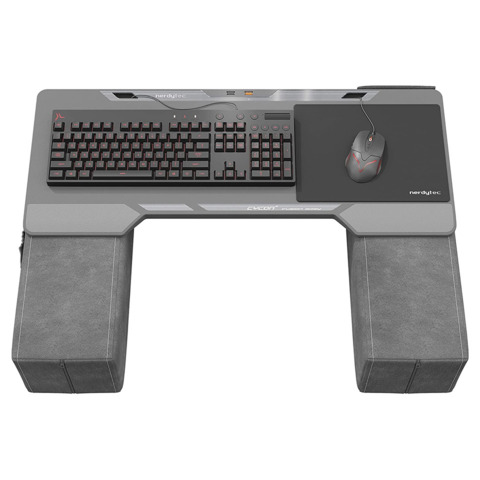
The Couchmaster Cycon 2 doesn’t come with a keyboard and mouse. Instead, it’s an ultra-comfortable docking station, providing a USB hub for your keyboard and mouse and then connecting wirelessly to your PlayStation. It offers a lot of space for you to nestle into on your couch, giving you armrests that are omitted on many other lapboard options. For that, it’s priced considerably higher at $180, while still requiring you to provide your own peripherals as well. But it’s a great option if comfort is as paramount to your gaming as your choice of input device.
The dark side is set to strike back in a terrifying way in LEGO Star Wars Terrifying Tales, a Halloween-themed special coming to Disney+ this October.
LEGO Star Wars Terrifying Tales will premiere on Disney+ on October 1, kicking off this year’s Hallowstream celebration. The all-new animated special from Lucasfilm and LEGO will shine a saber on the villainous dark side of the Star Wars galaxy, illuminating a terrifying tale set after the events of The Rise of Skywalker. Check out the poster for the spooky special below:
According to StarWars.com, the special will see Poe Dameron and BB-8 make an emergency landing on the volcanic planet of Mustafar where they’ll meet the greedy and conniving Graballa the Hutt, who has purchased Darth Vader’s castle and is renovating it into the galaxy’s first all-inclusive Sith-inspired luxury hotel.
Poe and his trusty sidekick will venture deep into the mysterious castle while his X-Wing is in repair. They will be joined by Graballa and the crime boss’ mechanic Dean, together with Vader’s loyal servant, Vaneé, who will play host to the terrifying tour, sharing three creepy stories linked to ancient artifacts and iconic villains from across all eras of Star Wars.
As Vaneé spins his tales and lures our heroes deeper into the shadowy underbelly of the castle, a sinister plan will emerge. The “plucky and courageous” Dean will be on hand to help Poe and BB-8 to face their fears in a bid to stop an ancient evil from rising and escape to make it back to their friends.
LEGO Star Wars Terrifying Tales features a talented voice cast that includes Jake Green as Poe Dameron; Raphael Alejandro as Dean; Dana Snyder as Graballa the Hutt; Tony Hale as Vaneé; Christian Slater as Ren; Trevor Devall as Emperor Palpatine; and Mary Elizabeth McGlynn as NI-L8.
David Shayne is writer and executive producer, and the director is Ken Cunningham. James Waugh, Josh Rimes, Jacqui Lopez, Jill Wilfert, Keith Malone and Jason Cosler are executive producers on the latest LEGO Star Wars special, which is produced in collaboration with Atomic Cartoons.
LEGO Star Wars Terrifying Tales will debut on Disney+ on Friday, October 1. It follows last year’s LEGO Star Wars Holiday Special, which arrived on Disney+ on November 17, the same day the original Star Wars holiday special aired on CBS in 1978. IGN rated it a 7, saying it was “an unexpected treat for those looking for an extra bit of closure on the Skywalker Saga.”
The Halo Infinite multiplayer beta was generally well-received, but there is always room for improvement. One issue that some players reported was that the visual indicator that tells you if a soldier’s shields are down/cracked–thus opening them up for a final shot or two–is not as clear as it could be.
Quinn Del Hoyo, who is the lead sandbox designer on Halo Infinite, said the development team at 343 agrees with this feedback. In fact, the developers are “actively pursuing this issue,” Del Hoyo said on Twitter. “We made some improvements on Friday that the team will test internally this week.”
Click To Unmute
Size:
Want us to remember this setting for all your devices?
Now Playing: Halo Infinite Technical Preview Livestream
Hey Joey, we agree as well. The team is actively pursuing this issue. We made some improvements on Friday that the team will test internally this week. https://t.co/cLb8GhQUzo
In Halo Infinite, like previous Halo games, soldiers have pools of shields and health. Once shields are depleted, players are highly vulnerable. Past games have provided clear visual (and audio) cues to let players and enemies know when shields are down, so fans may be happy to learn that 343 is improving this experience in Halo Infinite after the beta.
The Halo Infinite multiplayer beta was based on a months-old version of the game, so there are likely other changes to come as well from what was seen in the beta.
A second Halo Infinite multiplayer beta is coming, and it’ll be expanded to more Halo Insider members, so be sure to sign up for the free Halo Insider program for a chance to get in.
A Halloween-themed Lego Stars Wars special will be released later this year. Lego Star Wars Terrifying Tales hits Disney+ on October 1.
The special’s cast includes Veep and Arrested Development star Tony Hale and Mr. Robot’s Christian Slater. Terrifying Tales is set after The Rise of Skywalker and focuses on Poe Dameron and BB8. The pair crash land on the volcanic planet Mustafar and end up inside Darth Vader’s spooky castle while Poe’s X-Wing is being repaired.
Hale will voice Vader’s loyal servant, Vaneé, who tells Poe and BB8 some scary stories while they explore the castle, while Slater plays a character named Ren. The voice cast also includes Jake Green as Poe, Dana Snyder as Graballa the Hutt, and Matt Sloan as both Emperor Palpatine and Darth Vader. Disney has released a poster for Terrifying Tales–check it out below:
Terrifying Tales follows the Lego Star Wars Holiday Special, which was released in November 2020. Both specials are directed by Ken Cunningham and written by David Shayne.
In terms of other Disney+ Star Wars shows, there are no fewer than 10 currently in various stages of development. The Obi-Wan Kenobi series is currently in production, with Ewan McGregor reprising his role as the Jedi master from the Star Wars prequels. McGregor recently teased that Obi-Wan might look a bit different from the last time we saw him.
The internet has come a long way since the days of its founding. Nowadays, huge companies have taken interest in how people browse the web and are willing to pour massive amounts of resources into farming data from individual users. But these companies aren’t even the threat you should be most wary about. There are hackers who have developed high-quality tools that can steal information from users who browse the internet unprotected. Although we all value safety in our daily lives, we often don’t apply that same standard to our online presence.
To resolve that issue, protect yourself with a two-year subscription to SurfShark VPN. Currently on sale, this subscription is dropping an additional 30% as a part of a limited-time promotion. Right now, you can get a SurfShark VPN 2-year subscription for just $40 (reg. $290) with code ANNUAL30.
Rated 4/5 stars by verified purchasers, the SurfShark VPN offers over 1,200 torrent-friendly servers and unlimited data that allow you to avoid geographical restrictions on certain websites so you can access whatever content you want. All of this runs through military-grade AES-256-GCM encryption and IKEv2 and OpenVPN protocols, which is a fancy way of saying that people are going to have a real hard time trying to track your data. And as a bonus, the CleanWeb feature that comes with SurfShark blocks ads and malware while you’re browsing, an addition that adds yet another quality piece of value to this deal.
Your true IP will be hidden to the world whether you’re browsing or gaming, and you won’t have to choose between speed and privacy because SurfShark provides the latter without comprising the former. With so many different features, it’s difficult to cover all of the great aspects of this VPN, but suffice it to say that this is a reliable piece of security software.
With unlimited connections, you can ensure that your whole household stays protected when browsing. Get the SurfShark VPN: 2 Year Subscription for just $40 (reg. $290) with code ANNUAL30 for a limited time.
Price subject to change
This content is from our partner StackCommerce. GameSpot may get a share of the revenue if you buy anything featured on our site.
The products discussed here were independently chosen by our editors. GameSpot may get a share of the revenue if you buy anything featured on our site.
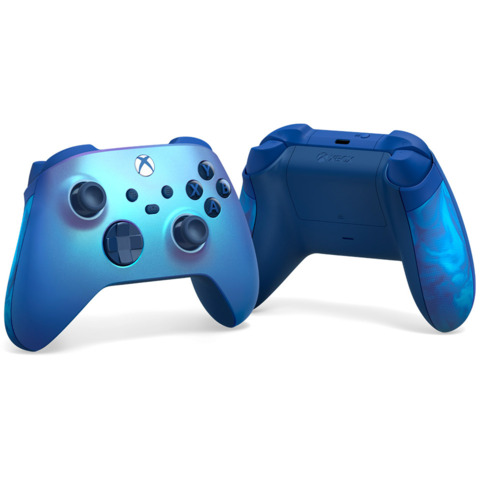
The new prismatic color finish on this Xbox controller shifts in the light, and preorders start today.
Microsoft has announced a new special-edition Xbox Series X|S controller with a pretty blue finish. The Aqua Shift Special Edition controller has a prismatic paint job that shines in the light. It’s available for preorder now and will be available starting August 31.
The controller features the usual Series X functionality, along with rubberized side grips with a special color swirl. It notably costs $70, the same price as other recent special-edition controllers like the Space Jam controllers, or a custom color scheme from Xbox Design Lab. That makes about $10-20 more than most standard controller colors, so you’re paying a premium for the unique look.
Fortnite Week 9 challenges are upon us, meaning players will soon have several new quests to complete to earn hundreds of thousands of seasonal XP in a hurry. The Fortnite Week 9 Legendary Quests will go live on Wednesday, August 4 at 7 AM PT / 10 AM ET, while the more numerous but less story-driven Epic Quests will follow exactly 24 hours later. Here’s your complete round-up of Week 9 challenges.
Week 9 Legendary Quests
Get Slone’s orders from a payphone (1) – 15,000 XP
Equip a Detector, then disable an alien billboard in one match (2) – 45,000 XP
Collect resources in Holly Hatchery (100) – 30,000 XP
Eliminate trespassers (3) – 30,000 XP
Place a Bioscanner in an alien biome (1) – 30,000 XP
Place Spy Probes (3) – 30,000 XP
Week 9 Epic Quests
Launch toilets with a Grab-itron (2) – 30,000 XP
Dance on an Abductor or as a passenger on a Saucer (1) – 30,000 XP
Avoid taking damage while dealing 100 damage to opponents in a single match (1) – 30,000 XP
Reveal an opponent with a Recon Scanner, then hit them with a Rail Gun (1) – 30,000 XP
Drive an IO vehicle with off-road tires (1000) – 30,000 XP
Use IO launchpads (1) – 30,000 XP
Carry an alien sample from a satellite station’s dish to an entrance at Corny Complex (1) – 30,000 XP
It’s another busy week for Doctor Slone, leader of the Imagined Order. In her relentless efforts to undermine the alien invasion, this week she will recruit you to disrupt more of the extraterrestrials’ living spaces. To get orders from Slone from a payphone, go to any payphone–they can be found at any bus stop. We’ll have guides soon for story-driven quests such as equip a Detector, then disable an alien billboard in one match, place a Bioscanner in an alien biome, and place Spy Probes.
To collect resources from Holly Hatchery, simply head to the residential locale and take your pickaxe to buildings, shrubs, and anything else, until you’ve collected 100 total resources. It should be easy, but just watch out for the trespassers. Of course, then you can head right back there in your next match to eliminate trespassers–three to be exact.
Several challenges will take you to Holly Hatchery this week.
Moving onto the Epic Quests, you can launch toilets with a Grab-itron rather easily once you find the new weapon, which is found on the Mothership, atop Abductors, or in standard chests. Take it to a residential area with more than one house, like Holly Hatchery or Pleasant Park, and look for the bathrooms inside homes where you can grab and launch the toilets.
To dance on an Abductor or as a passenger on top of a Saucer, the quickest way will be to just land on an Abductor right from the Battle Bus, then perform any emote. Whenever Fortnite instructions say to “dance,” the game accepts any emote as dancing. To avoid taking damage while dealing 100 damage to opponents, you should head to Team Rumble where you can respawn if you fail. All you want to do here is deal damage without taking any yourself, which is easier in Team Rumble where you can more frequently sneak up on someone in a firefight within the small Storm circle.
Reveal an opponent with a Recon Scanner, then hit them with a Rail Gun is probably something you’ve been doing all season. The Recon Scanner marks enemy players in the world for a few seconds, while the Rail Gun can be fired straight through solid objects at full power, so make sure to charge up your shot after you spot them with the Scanner.
To drive an IO vehicle with off-road tires, look for an IO vehicles–black sedan with IO insignia on the body–at any satellite station or within Corny Complex , while off-road tires are reliably found at any gas station. Throw the tires on, then drive for 1,000 meters. This is a cumulative challenge, so don’t worry if you don’t get it all in one match. Oh, and don’t forget gas. At that distance, you’ll probably need it. You can use IO launchpads at any satellite station too. You only need one and each station has one marked by its vibrant vertical light, so jump on it and this challenge will be complete.
Lastly, to carry an alien sample from a satellite station’s dish to an entrance at Corny Complex, head back to any satellite station and look for the interact object at the base of its huge satellite dish. Take that and carry it to an entrance at Corny Complex. Due to its close proximity, we recommend landing at the dish just east of Corny Complex.
Peggy Carter’s Captain Britain will appear in every season of Marvel’s multiversal animated series What If…? according to executive producer Brad Winderbaum.
During a press conference (as reported by CBR), the Marvel producer said, “Early on in development, as we were starting to get [head writer A.C. Bradley’s] scripts, and starting to look at the arc of the series, that there was going to be a character that bubbled up and became more important […] Not more important than the rest, but [one that] had a strong relationship with The Watcher, who is really our driving force behind the series, and that’s Captain Carter.”
That importance means we should be seeing Captain Carter more than in a single one-off anthology episode: “We realized as we started developing the second season that Captain Carter was going to be the character we would revisit in every season, and continue that adventure,” Winderbaum said. “Obviously, we’re telling a story on a giant, multiversal canvas. So you never really know who’s going to pop up where, and when. It’s very much an anthology, but there’s always opportunity for fun connections to be made.” With Captain Carter set to return season-by-season, it’ll certainly be exciting to see how the MCU fades in and out its other heroes as each season plays out.
Captain Carter will be Marvel Studios’ first take on the comic book hero Captain Britain. In What If…?, she is a multiversal version of Peggy Carter who receives the same super-soldier serum that gave Captain America his powers. Captain Carter, as with other heroes in the show will be voiced by her live-action counterpart Hayley Atwell when the show airs on August 11.
In other What If…? news, we recently sat down with head writer AC Bradley, who made it very clear that regardless of its animated style and anthology premise, everything within the upcoming series is being considered canon, which makes it just that tiny bit more unmissable when it launches on Disney Plus this month.