Mayim Bialik will be the first guest host of syndicated episodes of Jeopardy in the wake of Mike Richards’ departure from the popular quiz show.
According to Collider, the Big Bang Theory alum will temporarily cover weeknight hosting duties on Jeopardy, fronting 15 episodes of the new season while the quiz show searches for a new host to take to the podium. Bialik was originally tapped to host the show’s primetime specials and spin-offs rather than the syndicated hosting position due to her busy schedule.
Bialik serves as an executive producer and stars in the title role of the Fox sitcom Call Me Kat, which was renewed for a second season earlier this year. However, Collider notes that “Bialik is currently on hiatus from Call Me Kat,” meaning that her schedule has opened up just enough to allow her to take the first guest spot on Jeopardy’s upcoming 38th season.
It was announced last week that Richards would be stepping down as the new host of Jeopardy, just one day after the Anti-Defamation League called for an investigation following a report by The Ringer that Richards had allegedly made offensive and sexist comments during his time on the Randumb Show podcast in 2013 and 2014.
Sony’s search for a long-term host of Jeopardy has been turbulent ever since show host Alex Trebek passed away in November 2020. The series has run with several guest stars over the past year, including the likes of Aaron Rodgers, Joe Buck, and fan-favorite LeVar Burton. Viewers should expect to see more guest hosts on the show until a full-time host is found.
Production resumes on Jeopardy this week, with the upcoming 38th season of the classic quiz show expected to begin airing on September 13.
The population of Square Enix’s Final Fantasy 14 is booming, but with the game’s recent popularity also came growing pains in the form of login queues, and, now, the inability to create new characters entirely on worlds occupying the game’s most populated North American data center.
All worlds on the Aether data center are now classified as “congested,” meaning they are at full capacity. Square Enix says it has already expanded the maximum world capacity as much as possible, and were it to do so even further, it would result in hours-long queues for players. That’s something Square Enix would like to avoid.
Click To Unmute
Size:
Want us to remember this setting for all your devices?
Now Playing: FINAL FANTASY XIV ENDWALKER Full Trailer
New players, or those just wanting to create a new character, will need to do so on a world hosted on either the game’s Primal or Crystal North American data centers for the time being, though Square Enix says those worlds are also heavily populated.
Square Enix says it would like to expand its data centers and add new worlds, but there are a few things standing in the way of making that happen anytime soon. The first is a global shortage of semiconductors, with Square Enix saying it is “still struggling” to get the necessary equipment to make upgrades to the game’s infrastructure. COVID-19 restrictions in Japan also make it difficult to travel outside of the country to implement server upgrades.
Some upgrades will be coming to European data centers, with a hotfix increasing world capacity in the region and additional upgrades coming in September that should allow for even more players.
“Considering the current situation, we will likely require more time in implementing our large-scale solutions,” Square Enix writes in an official post on the Final Fantasy 14 website. “The circumstances surrounding our infrastructure are far from ideal, but I promise that we will continue to persevere in implementing any solutions we can!”
Final Fantasy 14’s rising popularity comes in part thanks to prominent Twitch streamers, many whom almost exclusively played and streamed Blizzard’s World of Warcraft, having started streaming Square Enix’s MMO instead. That has contributed to record concurrent player numbers for Final Fantasy 14, as more and more people become curious about the game. The fact that Final Fantasy 14 also has an extensive free trial means potential players can check out a huge chunk of the game without having to pay a dime, which is likely also contributing to overpopulated servers.
Final Fantasy 14’s latest expansion, Endwalker, is due to release November 19.
Descending into the very depths of hostile alien territory sounds like an express elevator ride straight to hell in Aliens: Fireteam Elite, but provided that you’ve spent some time making certain that your Colonial Marine has slotted in some accessories and skills into their build, it’s not an impossible challenge. Progression in Aliens: Fireteam Elite requires some self-improvement, as the game makes use of a Combat Rating system to gauge just how prepared you are for the action that lies ahead. Below, we detail everything you need to know about Alien: Fireteam Elite’s combat rating system.
How The Combat Rating System Works
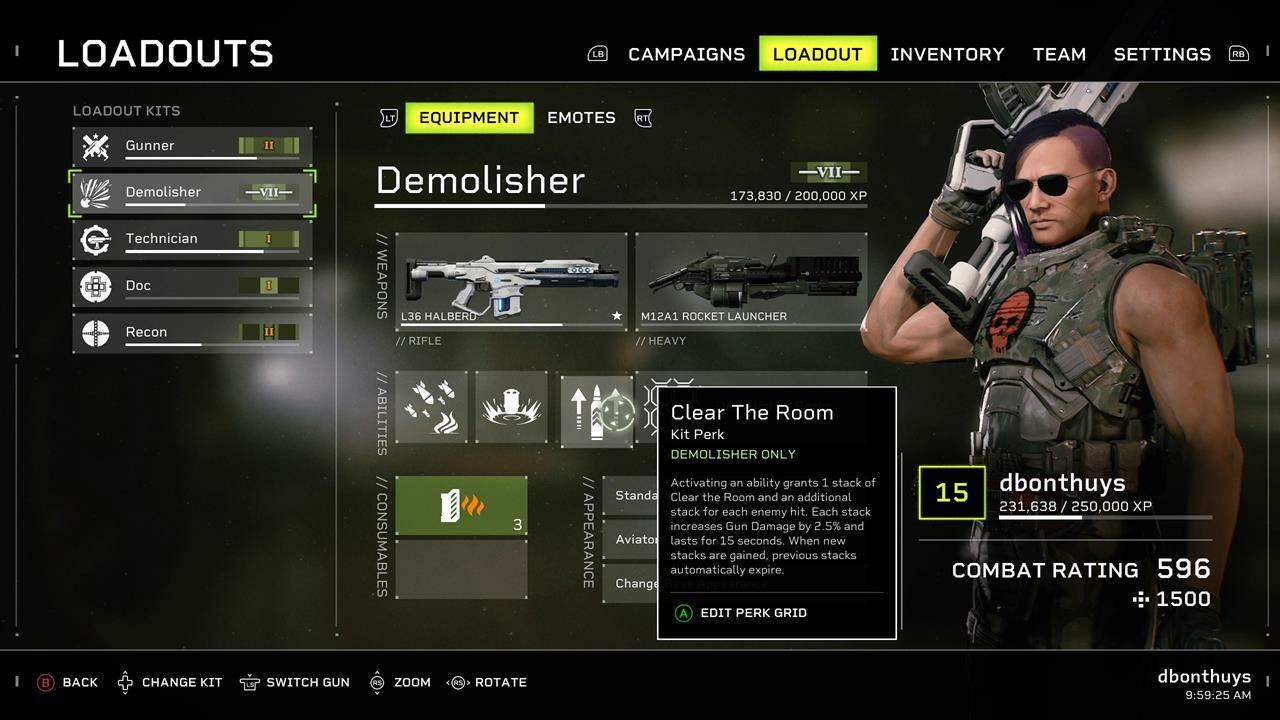
The Combat Rating system works across two parts of a character build: Weapons and class perks. For example, an ordinary pulse rifle may carry a combat rating of 40, but once you unlock and start adding some modifications to it, you’ll be able to boost its stats so that it carries a combat rating of 90. Using a particular weapon also levels it up, and with a few thousand bugs killed, you’ll be wielding a rifle that shoots harder, faster, and more accurately. Each class can carry two weapons, and each weapon can have three modifications added to it that provide several extra statistical bonuses and an overall increase in character power.
One magazine for a submachine gun may provide 20% extra ammo carrying capacity; another might refill the gun by 10% for every enemy you kill. These weapon mods are earned throughout the campaign as rewards, as well as from finding hidden caches and completing tactical opportunities. If you’ve got some credits to spare, you can purchase new weapons and modifications from the supply store on the Endeavour.
Experiment with these mods–constantly check your inventory to see what you’ve unlocked, and once you’ve put them together, you’ll be dropping bugs quicker than ever.
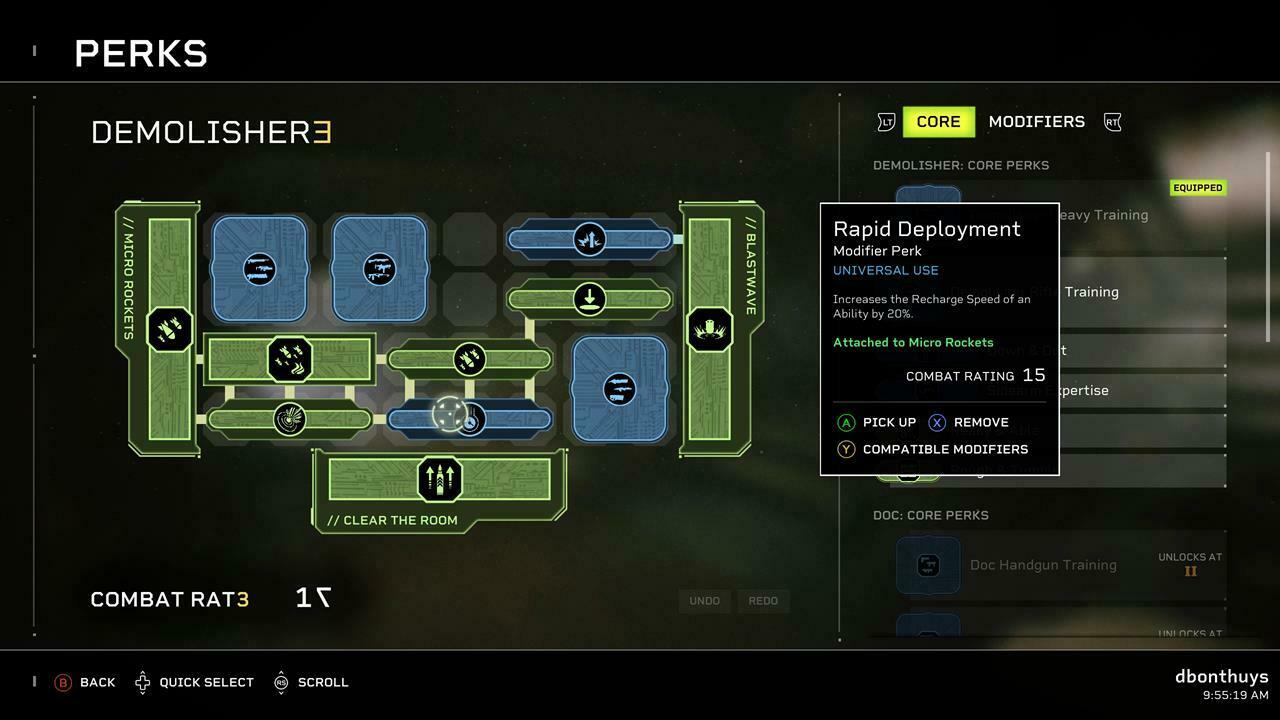
Constantly tinkering with weapons is only half of the formula for increasing your Marine’s combat readiness though, as you’ll want to spend time experimenting with character perk grids. Each class has a grid into which you can slot modifiers, which allow for improved stats for handling weapons and alterations to how the unique skills of a particular class function.
Take a Demolisher for example, who can fire off micro-rockets as part of their offensive package. Using the grid system after the Demolisher has been sufficiently leveled up allows for that ability to be altered so that instead of firing a small cluster of missiles, the class launches a small spread of napalm rockets that leave behind a trail of flames, which will continue to damage any enemies that pass through them. Each modifier carries a combat rating total as well, so the more modifiers you slot in, the more powerful your class becomes. You’re also incentivized to strategically pick the mods and perks that can give you the highest combined rating.
Even better, each class can unlock a series of modifiers that can be applied to other classes, allowing them to quickly catch up in the power arms race. It’s worth noting that slots and abilities are unlocked as you level up, although you can buy more modifiers from the supply store. Keep an eye on where you place your more unique modifiers, though, as linking them directly to your abilities chains them together so that your bonus buffs gain an extra edge along the way.
The perk grid is a deep system that presents a few interesting opportunities for mixing and matching perks, all of which go a long way toward creating a marine that can be tailored towards your personal style of play.
For more on Aliens: Fireteam Elite, keep an eye on GameSpot this week, as we’ll have more guides up throughout the week, tips for surviving everything that a Xenomorph hive can throw at you, and our final review on the game.
Aliens: Fireteam Elite is finally out, and if you’re looking to hunt hundreds of creatures unclouded by conscience, remorse, or delusions of morality, then the Cold Iron-developed game might just be worth looking into. While the game looks like a simple action experience on the surface, it’s actually full of deep character customization gameplay mechanics, brings a varied collection of enemies, and packs an impressive arsenal of weapons to unlock.
Here are some tips and tricks to help you survive in the war against the Xenomorphs, as well as explain the game’s various systems for keeping your Colonial Marine powered up and frosty.
Click To Unmute
Size:
Want us to remember this setting for all your devices?
Aliens: Fireteam Elite has four classes to choose from when you begin the game, as well as a fifth one that unlocks after the main campaign has been completed. So which class is right for you? That all depends on how you prefer to play team-based games, as you’ll be able to choose between offensive, defensive, and support classes to survive the Xenomorph hordes. The Gunner is a well-rounded attacker, the Demolisher is great for clearing out entire swarms of cannon fodder, the Technician provides plenty of support firepower, and the Medic will keep your team in the fight against even the most overwhelming odds.
Having a well-balanced team is the key to success, with each class bringing signature tricks and firepower to each encounter. Nothing’s stopping you from assembling a team of three Demolishers, though, and Aliens: Fireteam Elite allows for even that squad to still have plenty of variety thanks to how you can level up your classes and invest in their core abilities.
Avoid the acid
This one goes without saying, but don’t forget that every Xenomorph has acid blood pumping through its veins. Every dead bug leaves a temporary acidic obstacle in its wake, although if you’re in a rush, you can dodge over it to avoid losing any of your health points. Just be wary of a particular glowing green breed of Xenomorph, as it’s tougher hide allows it to get closer and violently explode when it dies.
Watch out for Prowlers
Speaking of dangerous Xenomorphs, you’ll want to be wary when walking down a supposedly safe corridor. If one of your marines says: “Hear that?”, that’s a sign to stop and examine the area for a lurking Prowler. These red Xenomorphs hide around corners or hang from ceilings, and if you get close enough, they’ll pounce and deal significant damage. Avoid this trap, focus your firepower on it, and bring it down to size before it can inflict harm on your team.
Keep an eye on the ceilings
When you’re dealing with Xenomorphs, you’re fighting a cunning foe that won’t just rush you from the ground. The perfect killing machines will often bounce around walls, ceilings, and cover spots to get close to you, so keep an eye on your surroundings at all times to avoid being ambushed by the bugs. Yes, they are indeed coming out of the walls.
See an egg? Shoot it
If you’d like to avoid any parasites calling your chest cavity home for a few hours and then explosively leaving the nest, make certain that you keep your eyes open for any eggs that house the dreaded face-hugger. With a bad habit for violating personal space, these eggs will spawn the vile incubators when you get too close, and should they latch onto you, you’ll lose some vital health in the process.
Unless you’re fighting Synths, don’t worry about cover
Alien: Fireteam Elite’s cover may seem pointless as Xenomorphs use their agility to close the distance, but the game’s swerve into cover-based shooter territory is necessary when dealing with Synthetic androids in the later missions. Unlike the Xenomorphs, Synths are well-armed and are able to demolish a fireteam from a distance with their precision aim. Hugging nearby walls to avoid their attention is vital, but you’ll also have to stay alert for heavy Synths who can take more damage and units armed with flamethrowers.
Switch to electrified ammo to disrupt their patterns, let nearby Xenomorphs harass them, and aim for the head when dealing with this crafty threat.
Choose the right ammo
In addition to reliable lead, rockets, and proximity grenades, you’ll be able to load a few rounds of elemental ammunition into your weapons when you find or buy the right consumables. Xenomorphs may be remorseless killing machines, but fire works great on burning through their defenses and dealing damage over time. For synthetic enemies, you’ll want to switch to shock rounds that overload their circuits and leave them open for a counterattack. It’s worth noting that whenever you activate this special ability from your inventory wheel, it’ll only apply to one of the two weapons that you’re currently using, so think carefully about which firearm you want to load the ammo into specifically.
Don’t feel like aiming? Play as the Demolisher
While every class is equipped with weapons and skills that make them valuable, the Demolisher is the go-to class for players having a hard time landing shots on Xenomorphs. Demolishers can choose between the Smartgun and flamethrower as their secondary weapon when starting out, with the former featuring an auto lock-on option that targets the nearest enemy to you and unleashes a barrage of rounds. A Smartgun has a meaty magazine as well, allowing it to easily annihilate an entire horde of Xenomorphs when you hold the trigger down.
The flamethrower barely requires any aiming though, as you merely need to point it in the general direction of anything dangerous and burn it to a crisp when you pull the trigger back. Like the Smartgun, the default magazine size is massive and you’ll be able to clear rooms with this weapon while applying burn effects to heavier enemies.
Level your weapons up
You’ll be able to experiment with different loadouts in your home base aboard the Endeavor, where you can dig into the weapons available in each loadout and find the build that suits you best. Once you’ve got a character wielding weapons that work best for you, stick with them, as you can level your arsenal up. Once you’ve killed a few thousand Xenomorphs, a weapon at its maximum level will deal more damage and handle better, thus also increasing your overall Combat Rating. Spread your selection of weapons across your various classes to have them consistently gain experience.
Experiment with the combat tree to grow your Combat Rating
It may look confusing at first, but Alien: Fireteam Elite’s system for growing your Marine is actually pretty easy to understand. Leveling up a Marine unlocks slots in their skill tree, as well as new abilities and perks. Some of these skills are locked to a specific class, others benefit all five loadouts that you can choose from. The unifying factor here is that there’s only so much space for you to slot skills into, leaving you the option of investing in being an all-rounder or specializing in a certain field.
For example, the Demolisher’s shoulder-mounted micro-missiles can be upgraded into a wide spread of napalm projectiles that leave a lingering field of fiery death behind after they’ve exploded. If you’d prefer for your core skills to be enhanced instead, you can add tabs that buff your reload speed and the maximum amount of ammo that you can carry. It’s worth checking in with the officer in charge of supplies, as you can grab a few universal perks from him, provided that you have enough currency on-hand.
Focus your firepower on big threats
While your regular Xenomorph is no match for a small burst of high-velocity lead from a tried and trusted M41A pulse rifle, there are plenty of predators behind them that can take a significant amount of damage before they’ll finally fall. Besides hearing your commanding officer frantically shout about these Xenomorph variants appearing, you’ll spot them on your radar as teal or orange blips. These hostiles should be a priority target when they’re in range, as it takes a barrage of firepower to destroy their armor and knock them down.
Keep the battlefield clear, unleash your special abilities, and aim for the weak spots to deal enough damage to take down these brutes before they can disrupt your party.
Stock up on gadgets before you head out
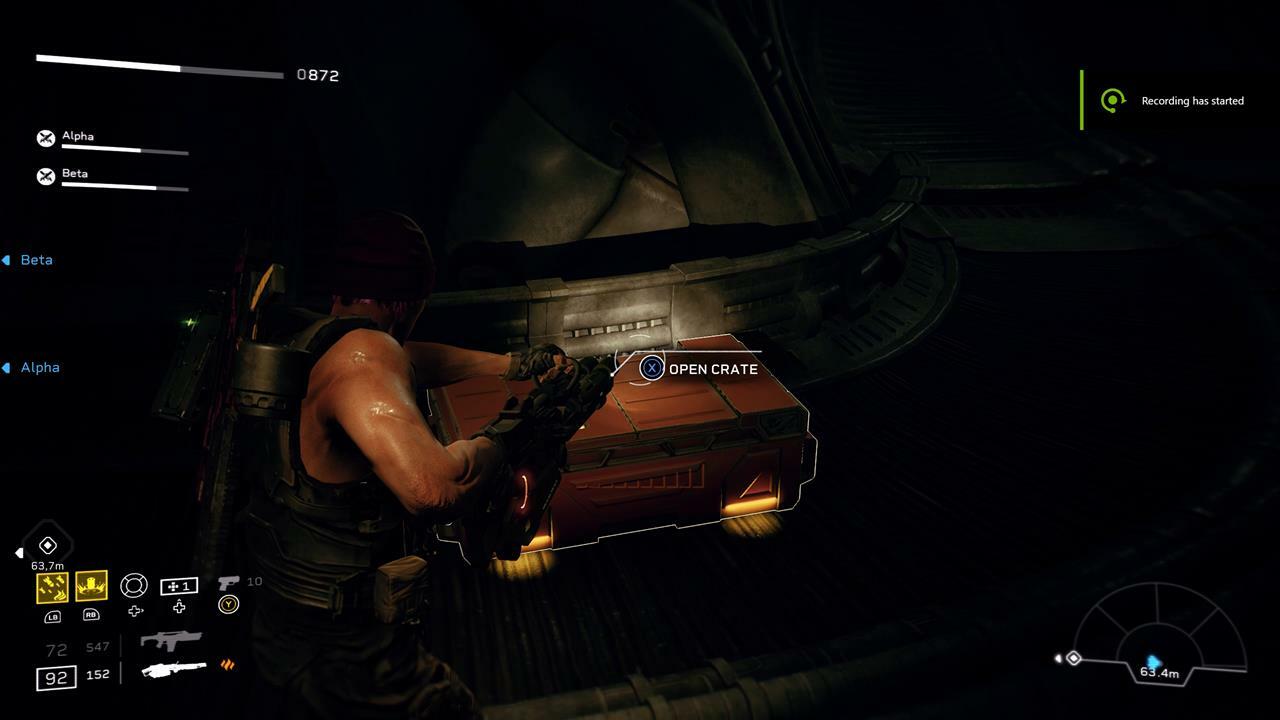
While every ambush point in a level has a crate or two with some useful gear, you never know what you’re going to get, as the inventory is always randomized. Alternatively, it’s always worth spending a few credits at the Requisitions store so that you have access to combat boosts that complement your character. Whether that’s a turret that shoots incendiary rounds or a drone that makes enemies weaker, a small investment before a mission goes a long way towards completing a run and banking the rewards at the end of it.
Keep an eye open for hidden caches and intel files
There’s a hidden cache in each level, usually tucked away in a section of the map that’s off the beaten path, and it’s worth hunting for. Inside of each cache you’ll usually find a handy consumable item, unlock new cosmetic gear or emotes, and a weapon accessory. If you’re playing with friends, they’ll have to open the cache individually to gain the gear inside so make certain that you pop an alert whenever you find one. Other collectibles in the game include intel files, with each location having a number of them
Stick together
While it’s tempting to go all gung-ho as you take on the Xenomorph and Synthetic hordes, that’s a recipe for a quick death in Aliens: Fireteam Elite. You’ll want to stick close to your teammates, especially those members in your party who can provide several beneficial buffs to the offense-heavy members of your squad. Medics can lay down a drone that provides a constant stream of health, while Recon members of the team will keep your guns loaded with an ammo-generating pod, perfect for when you want to take down a swarm while using the best tools in your arsenal.
Challenge cards are a great way to level up quick
Increasing your character and weapon levels in Aliens: Fireteam Elite can be a grind, but if you’re looking to shortcut the process while adding a fun challenge to the game, then it’s well worth looking at activating a challenge card. Earned through completing Tactical Opportunities and finding hidden caches, and available for purchase from the Requisitions store, these cards can transform how a level plays into a wild experience. Tired of gunning down Runners? There’s a card that turns all of them into explosive Bursters if you’re up to the challenge
Maybe you want to have a Xenomorph Warrior spawn in every single room you’re in, maybe you want to do increased headshot damage at the cost of decreased regular damage to the torso, or maybe you’re brave enough to activate a card where the only weapon you’re allowed to use is a simple handgun. The choice is yours, and the end result is a big increase in the experience points and resources that you earn at the end of an encounter.
If you’re lucky, you might even unlock an exotic card that offers great rewards for merely completing a level. One thing to bear in mind, though, is that only one card can be active at a time, and if all three players activate a challenge card, the game will randomly choose which one to use. Cards are also consumed when you use them, so make sure you’re confident you can handle the increased difficulty.
Check your Tactical Opportunities every day
Tactical Opportunities offer you special objectives to complete in exchange for resources, experience points, and other rewards. Players having two daily bounties and one weekly extra mission objective to pursue. So far these optional missions have ranged from playing two missions as a different class, shooting a number of Facehugger eggs, or even taking down 300 enemies with a handgun. They’re worth attempting, as the rewards for completing a Tactical Opportunity include a substantial amount of credits and bonus gear. All handy stuff, for building your marine into a lean and mean fighting machine.
Red barrels go boom
There are two constants in the universe: first, in space, no one can hear you scream, and second, red barrels will always be the best makeshift explosive to use when taking on the worst that the galaxy has to offer.
For more about Aliens: Fireteam Elite, be sure to read our full review.
A new season of Destiny 2 kicks off today, but ahead of all the upcoming seasonal changes, tweaks, and new content dropping into the game, fans are thirsty for an answer to a question that has been living rent-free in their heads all year: How tall is Savathun the Witch Queen?
Destiny 2 developer Bungie took to Twitter to provide a numerical reply, saying that the cunning Hive god is in fact suggested to be around 21 feet tall, which works out to more than three Xbox Series X fridges stacked on top of each other, or roughly 58.6 GameCubes placed on top of each other in a very perilously unbalanced stack.
We have limited details on this embodiment of the Witch Queen Savathûn, but her stature suggests a height of 21 feet.
That’s very tall indeed, but how does Savathun stack up to gaming’s other iconic personalities who have no trouble at all from grabbing items off the top shelf? Compared to Resident Evil Village’s Lady Dimitrescu, who clocks in at 9 foot 6 inches, Savathun towers above her.
Even Destiny 2’s infamously tall commander of the Cabal forces, Empress Caiatal, is a paltry 9 foot and 10 inches, well below Savathun’s almighty view from the top. The only way that either character could look eye-to-eye with Savathun would be for one of them to stand on the other’s shoulders, provided that they can find a trenchcoat big enough to hide their deception.
It’s worth noting that as a Hive God who follows the Sword Logic, Savathun can become even more gigantic when she enters her Ascendant Realm and uses paracausal energy to mass shift into a more titanic form. Basically, there’s nothing that Capcom can throw at Bungie to reclaim its thirst trap crown.
Other less-important details on Destiny 2 will be rolling out today, as Bungie prepares to launch Season of the Lost this week, while also providing a deeper look into all the new content arriving in The Witch Queen.
Some of those details have slipped out ahead of schedule, and it looks like fans can expect new crafting systems, a Glaive-type weapon category, and a release date of February 22, 2022. Stay tuned to GameSpot today, as we’ll be covering all the big reveals from The Witch Queen showcase event.
Stranger Things is one of Netflix’s biggest and most recognizable TV shows, and as such, there have been conversations about how to grow the series, director Shawn Levy has said. But don’t get too excited about any potential spinoff just yet. Conversations about how to expand the wider Stranger Things universe are “hardly evolved,” Levy said in a new interview with Collider.
“I’d say what’s been made clear is this is obviously a tent pole, arguably the tent pole franchise in the history of Netflix,” Levy said. “Obviously certain other shows played key roles in their evolution, but Stranger Things with 196 million viewers over the time that we’ve been on the air, that’s a lot of household, 196 million. And it’s unique in that Netflix service.”
Levy acknowledged that “there is an interest and a real voracious appetite for any offshoot” of Stranger Things, and this could be “any other iteration format, or extension of the franchise, the characters, the mythology.”
“Certainly those conversations are hardly evolved, but they’re also not non-existent, boy did I dance around that one. And you cannot take those words and turn it into a headline, that’s like Stranger Things, executive producer, Shawn Levy confirmed spinoff because I didn’t do that,” Levy said.
“It is a kind of perfect storm combination of COVID shutdown, slower pace of filming in COVID protocols and health protocols, which are necessary, and coincidentally we chose Season 4 to be by far–and I mean, by far, far, far–the most ambitious of the seasons,” he said.
The Sony Bravia X90J is a challenging television to review, even when compared to only other Sony televisions. On paper, and visually, it looks strikingly familiar to last year’s X900H. But that Bravia name brings with it the promise of higher-end performance, exclusive features, and a higher asking price.
With the X90J, not only are we asking if it’s $200 better than the great X900H from last year, but how does that price compete against something like the Vizio P-Series Quantum? There is a lot to consider and comparing final scores is unlikely to provide you a straight answer.
When looking at the X90J and comparing it to Sony’s X900H, I feel like I’m looking at identical condos, but one has a longer list of amenities. For some, those amenities are a huge selling point and the $200 surcharge will be more than worth it. For others, they’ll be as ignored as that hot tub you have 24-hour access to, but only used that one time right after you moved in.
Sony X90J – Hardware and Software
The Sony X90J looks great from the front, and mediocre from the side and back. The thin bezels are fabulous and the understated logo on the front along with the slim legs looks great. The television is also extremely thin. From the front and the sides, it’s great.
The back is just rounded, bland plastic and unfortunately the X90J has no cable management to speak of – not even leg clips.
Because of this, I really wish the power port and the HDMI ports were all located on the same side, but all of the HDMI ports, the cable plug, the ethernet port, and USB ports are all on the left side of the television while the power outlet is on the right. If you want to try and keep a clean look to your media console or desk, the X90J won’t do you any favors.
One last note: I know that the distance between the legs is probably a decision made primarily for stability purposes, but it severely limits where the television can be placed. If you don’t want to wall mount it – which I did not – you need a very wide desk or media console.
The X90J remote is pretty big, and gigantic by 2021 standards. It has all the legacy controls that have been scaled back or dropped entirely by brands like TCL, Samsung, and Vizio, like a full number pad and several customizable buttons. It also has a huge three-inch space at the bottom of the remote that is just blank. Despite its size, it’s not a bad remote and this is the first time that the four quick-launch buttons are actually all platforms I regularly use: YouTube, Netflix, Disney+ and Prime Video. It also supports voice operation which makes searching on YouTube a breeze.
The television is powered by Google TV, which is the new and improved version of what was once called Android TV. It puts an emphasis on customized content more than it does apps, which is similar to how Vizio Smartcast works. It has the advantage of having that content-first design but also has more apps available than Smartcast does, which gives it the edge in my book.
Google TV runs extremely smoothly on the X90J and the browsing experience is excellent. Android TV was always in my top three favorite television operating systems, but now that we’ve transitioned to Google TV and it runs smoothly on new displays, it’s vying closely for my favorite behind Roku. Google also does a better job tracking what content you like from a variety of apps, which Roku or Vizio simply don’t have the capacity to do.
One of the added bonus features of this TV is the Bravia Core streaming service, which Sony offers only on select televisions. It promises higher-quality streams for a set of movies due to a more data-rich delivery. It’s awesome that it’s there, but I don’t know how much of a “bonus” this is for folks who are probably pretty happy with their current suite of streaming choices. Additionally, Sony’s processing is so good, most will have a hard time telling the difference between the higher bitrate Core content and something that has been processed out of Netflix. Speaking of processing…
Sony X90J – Picture Quality
The X90J has what Sony calls a Cognitive Processor XR, which is a technology that the company touts as being able to understand how humans see and hear, making it able to deliver content with stronger contrast, better brightness, and better color depending on what is being watched. That’s a lot to promise, and when watching 4K HDR content, I honestly could not tell you more than “it looks good.” Is it doing more? Probably. Could I tell you based on how the average person uses their TV? Not really. But this is only one slice of the Sony image quality cake.
What I will say is that Sony televisions are known for outstanding image processing and Sony did not pull those punches here. Combined with that Cognitive Processor is a new contrast booster which all add to the already notable prowess of Sony’s processing. While I will have difficulty pulling out what each individual piece of what Sony is doing here, it does unequivocally equate to a stunning picture quality.
As a result, 4K upscaling is fantastic. The poor graduation of highlights from low bitrate content (like the skies above the desert planets in the first season of the Mandalorian) is beautifully fixed and smoothed out as well. Sony regularly leads the pack with this technology and that remains true in the X90J.
While I’ve heard others who have reviewed this television say it doesn’t have great viewing angles, I have to disagree. While yes, because it’s a backlit LCD television it absolutely has a “best” viewing location of straight ahead, if you’re forced to watch this tv from off angles, you’ll still be treated to surprisingly good contrast and color.
One issue I had with this television – and it is a criticism that is shared with the X900H before it – is that it easily shows glare. The screen is very shiny and the television doesn’t get particularly bright either, so it’s not capable of overwhelming even the lightest of reflections. Across the room from the television I have a set of LED panel lights and even set to low, I can very clearly see them reflected back at me during gaming sessions.
Sony X90J – Contrast
Up to this point, I was ready to argue that televisions not using either OLED or Mini LED technology were not capable of making deep, luscious blacks. Sony has proven me wrong, as I was regularly shocked at how good the contrast is on this television.
Blacks are remarkably black. And, as mentioned, while the television is not particularly bright, its ability to push the blacks to such levels of darkness means it can generate some stellar HDR visuals, including in Dolby Vision.
One downside of this contrast is that the television has a tendency to crush blacks, which can be a problem for competitive games. There are portions of the map in Apex Legends that simply will not render any details, and I’ve been knocked out by players standing in these areas that I could legitimately not see.
I tweaked the settings quite a bit in Game mode – which is one of several settings you can gratefully tweak quite a bit to your liking in this mode – to account for this as best I could, but it is really hard to strike a balance of shadow detail and not washing out all the colors on the X90J.
Sony X90J – Stutter
Unfortunately, content that is running at lower frame rates (like movies or broadcast television) can stutter in slow-panning shots. “Stutter” refers to a shaky, jumpy, look to footage and it is particularly noticeable around the outside of the frame. It’s not just reserved for slow frame rate footage either, as I noticed that in gaming scenes that were running at 60 frames per second, if I walked slow enough and focused on the edges, that stutter would be visible.
Sony X90J – Local Dimming
Sony doesn’t publish its local dimming zone statistics, but a manual count showed 24. The company regularly touts that the number of zones is a specification that doesn’t do justice to how Sony uses them, and I agree to some extent. I think Sony does far more with just 24 zones than any other manufacturer can, but it still has limits.
These local dimming zones are quite large and when I tested the television to see how they controlled halo, it didn’t perform particularly well. In a pure testing environment, it was obvious: bright objects against a black background created a very visible halo.
However, testing environments aren’t real life, and in practical use cases it did not matter nearly as much to the point where I don’t think most who purchase the X90J will notice them at all. The only cases where you might see it is if you have subtitles projected over a very dark or black background. Otherwise, and this is also the case in gaming, it’s pretty much a non-issue.
Sony X90J – Next-Gen Gaming Support
HDMI Inputs 3 and 4 support 4K 120Hz and HDMI 1 and 2 are HDMI 2.0B ports. Sony says that it supports auto low latency (ALLM) and variable refresh rate (VRR), but the latter isn’t actually enabled on the television yet.
None of Sony’s televisions support VRR at the time of publication, and neither does the PlayStation 5 (PS5). Sony says that these features can be added via firmware update, but the company is currently waiting for the HDMI standard for VRR to be finalized, which offloads the responsibility.
Obviously VRR is supported on a host of televisions, is supported by Microsoft, and will be available on new HDMI 2.1 monitors, so it seems odd that Sony isn’t adding some kind of support. That said, I’ve experienced some strange software issues with other manufacturer’s HDMI 2.1 ports, so perhaps Sony is attempting to avoid any such problems by leaning too heavily on what might be buggy stop-gap solutions.
Whatever the case, lack of VRR support won’t matter for PS5 owners since the PS5 doesn’t support it anyway, but for Xbox or PC players players, that’s a disappointment. At the time of publication, Sony was unable to provide a timeline for when VRR support would roll out.
Luckily, ALLM is supported and works great. When the X90J detects a gaming source like the PS5, it automatically will turn on the TV if it is off and swap over to Game Mode. Game Mode deactivates many of the processors that Sony has running for high-quality picture content in exchange for low latency and low input lag.
Sony says that Game Mode itself takes full advantage of its backlight array and says that HDR games look as good as movie content – I agree, games look fantastic. For older Sony consoles that do not support ALLM, the TV will still swap to the Game Mode. However, this technology is limited to Sony devices, so it won’t work with your Xbox and you’ll have to manually swap over with the remote and lock your settings in manually.
Even without that processing active, 4K games look fantastic on this television. The Last of Us Part II, after its latest PS5 upgrade patch, and Destiny 2 look stunning on this television. Both the 60Hz cap of the former and the 120Hz cap in The Crucible in the latter worked flawlessly.
Sony X90J – Sound Quality
Sony has implemented a very impressive-sounding audio system into this television and uses not only speakers located behind the TV, but also behind the display itself. Sony says that the audio is dramatically improved because of this and it can even achieve more immersive, 3D audio.
In practice however, it still doesn’t sound particularly good. Is it better than what its competitors are doing? Yes, absolutely, but that doesn’t mean you should be satisfied with it.
Look, thin TVs are bound by the limitations of their physical space. Even adding more speakers and making them smarter by custom tuning isn’t going to fix the problem: there just isn’t enough room in this physical chassis to support the wide ranges necessary for immersive audio. Lows in particular are very weak on this television, and that’s something you’re going to find with all thin televisions on the market.
If you care about sound quality – which you absolutely should – you’re going to want to at least buy a soundbar, while an actual surround sound system would be of course preferable to that.
The announcement trailer for Call of Duty: Vanguard did not prominently feature Activision’s name or logo, instead opting to begin with “Call of Duty presents.” Now that the game’s alpha test is up for pre-load, fans have noticed that Activision’s name and logo are largely missing as well.
“Call of Duty has continued to expand into an incredible universe of experiences. This was a creative choice that reflects how Vanguard represents the next major installment in the franchise,” a representative told reporter Stephen Totilo. The publisher also sent the statement to GameSpot, and said it applies to both the trailer and the alpha startup page.
In the case of the Vanguard reveal trailer and the alpha startup screen, Activision’s logo never appears, and the company’s name only shows up in the boilerplate tiny-font legal text. According to CharlieIntel, every other Call of Duty game boots up by displaying Activision’s logo.
Here’s the Call of Duty: Vanguard Alpha start up screen. Very interesting to note…Activision logo does not appear. Only shows Activision at the end for copyright. Every other CoD game starts up with Activision’s logo. pic.twitter.com/VN8vGrpSHH
— CharlieIntel – Call of Duty News (@charlieINTEL) August 23, 2021
Vanguard’s first alpha test will take place this weekend, running August 27-29 on PlayStation consoles. It gives players a first look at the Champion Hill 3v3 mode. The rest of the game’s multiplayer will be revealed on September 7, and then a PlayStation-exclusive preorder beta will take place September 10-13. An open beta takes place later in the month on all platforms. For more, check out the full Call of Duty: Vanguard multiplayer beta schedule.
A new model of the Oculus Quest 2 virtual reality headset is out today and available to order now (see it on Amazon). While this isn’t a generational leap in hardware, the new model doubles the amount of storage you get for the price. Now, the baseline model has 128GB of storage and costs $299, replacing the previous version, which had 64GB for the same price.
All new Oculus Quest 2 headsets — the 128GB model and newly made 256GB ones — also sport a new silicone facial interface. In late July, Facebook pulled Oculus Quest 2 headsets off the market after some owners reported skin irritation. Owners of the original Quest 2 hardware can request a free silicone cover here.
As for the Oculus Quest 2 itself, it’s a fully wireless VR headset that offers a surprising amount of bang for your buck. It comes with the headset and two controllers, and that’s it. Unlike all other major VR headsets, no outside sensors are required.
That said, you can connect it to a computer, either with a wire or wirelessly, with accessories. That way, you can use it as a standard VR headset and play games from other online stores.
Ever wanted to relive the wonderful Spider-Man Trilogy (2002-2007) with Tobey Maguire? Well now’s your chance. The original trilogy is on sale at Amazon at the moment, with the Blu-ray copy coming down from $34.99 to just $18.49, including all three films. If you’re after that little extra bit of quality, the 4K film collection is also down to $62.75 as well.
This is your friendly neighborhood spoiler warning. If you want to know nothing about Spider-Man: No Way Home, turn back now.
A number of short sections of the trailer suggest that a lineup of villains including Doctor Octopus, Green Goblin, Electro, and the Sandman could be returning from across Tobey Maguire and Andrew Garfield’s Spider-Man movies.
So, if you’ve been meaning to catch up on the classic Spider-Man Trilogy with Maguire as Peter Parker, it’s a perfect time to, especially since both Goblin and Doctor Octopus are set to return from that universe.
Robert Anderson is a deals expert and Commerce Editor for IGN. Send him awesome gaming screenshots @robertliam21 on Twitter.