A group of creators working on the 14-year-old mod GTA United, built primarily inside Grand Theft Auto San Andreas, have decided to stop development fearing a DMCA takedown from Rockstar Games’ parent company Take-Two Interactive.
The modders said in an update post that the spate of DMCA takedowns the publisher has handed out in recent weeks raised many alarms. As a result, the team has preemptively decided to remove all of GTA United’s uploads, including those for Vice City 2 San Andreas and Liberty City 2 San Andreas, in preparation for some possible legal letter from Take-Two Interactive.
“Due to the increasing DMCA takedowns against various GTA San Andreas map modifications, it is with a heavy heart that we must announce that we decided to preemptively take all remaining instances of GTA United, including its predecessors VC2SA and LC2SA, down,” the modders wrote.
“This means that, while our team haven’t received a takedown notice, we opted ourselves to say goodbye on our own conditions, and that effectively now all our official uploads are taken offline,” the modders said. “We are sorry to all the people that enjoyed playing GTA United, many of which we had positive interactions with, but this is a step we felt was necessary, as Take-Two Interactive and Rockstar Games seem to gradually reject more and more ‘Modding’ of their games, even if it’s the older ones.”
GTA United is a San Andreas-based mod for PC. It, um, unites Grand Theft Auto 3 and Vice City’s maps to effectively replace the one in San Andreas.
This mod has been around for a decade and a half. Work on the project began in 2006, with the first beta launched in 2007 along with the official “Vice City 2 San Andreas” name. “Liberty City 2 San Andreas” came out in the same year. The two combined in late 2007 to form GTA United, which received a 1.2 version in December 2012 and remained available until now.
According to PC Gamer, Take-Two Interactive began issuing DMCA takedowns left and right in recent weeks to a handful of developers working on GTA-related projects. This includes GTA: Underground and the 15-year-old mod GTA: Liberty City, as well as HD texture packs for Vice City.
It’s unclear why Take-Two Interactive is so adamant about pulling mods for Rockstar Games’ older Grand Theft Auto titles. Fans speculate that Rockstar may be working on a series of remakes or remasters, but neither Take-Two nor any Rockstar developer has yet to comment on these rumors.
Horizon Forbidden West has reportedly seen its release date delayed until 2022. Sony has not made any official announcement, and no specific reason has been given yet.
Bloomberg reports that the purported delay would put the game in the first quarter of 2022, out of the big holiday launch window. This is the second such report we’ve heard recently, after reporter Jeff Grubb talked about the impending delay on the Giant Bomb show GrubbSnax.
Click To Unmute
Size:
Want us to remember this setting for all your devices?
Now Playing: Horizon Forbidden West Gameplay Reveal | State of Play
GameSpot has contacted Sony regarding the reports. Horizon Forbidden West is slated to come for both PS4 and PS5.
Forbidden West seemed relatively likely to slip, as PlayStation Studios head Hermen Hulst began floating a possible delay in June. He said at the time that “we think we are on track to release this holiday season” but noted “that isn’t quite certain yet.”
If confirmed, this would be the latest in a long string of delays this year. Many developers and publishers have cited development complications caused by the coronavirus pandemic, particularly to studio efficiency as they adjusted to work-from-home structures.
Horizon Forbidden West is the follow-up to Guerrilla Games’ 2017 hit Horizon Zero Dawn, which follows the heroine Aloy as through a nature-reclaimed post-apocalypse filled with vicious, animalistic machines. For more, read everything we know about Horizon Forbidden West.
The concept of a free-to-play Pokemon MOBA probably sounds like a dream come true to some people and a shameless cash grab to others. As a longtime fan of both Pokemon and Dota 2, I had my doubts about whether Pokemon Unite could successfully mix the best parts of these disparate gaming worlds, but my skepticism turned to delight after seeing how much fun this mobile brawler could actually be… at least for a little while. Unfortunately, Pokemon Unite only partially sticks the landing, resulting in an enjoyable casual MOBA with some dubious microtransactions and little interest in pushing the boundaries of the genre.
Pokemon Unite’s premise will be instantly recognizable to anyone who has so much as glanced at a MOBA in the last 10 years: two teams of five players, two symmetrical lanes littered with auto-defending towers, and a “jungle” full of neutral enemies filling the space in the middle and around the edges. Each player takes direct control of a single Pokemon from a decent roster of 21 (including favorites like Greninja and Garchomp) that gets stronger as the match goes on. You’ll clash along the lanes, killing your opponents and pushing toward enemy towers until one team has been driven back to their base, forced to watch helplessly as their towers fall.
Except they don’t actually fall, in Unite’s case. Rather than ending with the spectacular destruction of the enemy’s base, Unite’s matches are on a 10-minute timer with the winning team being whichever squad scores the most points before the buzzer sounds. These points, called Aeos Energy, are collected by defeating the wild Pokemon that spawn around the map, then banked by dunking them Space Jam-style into the enemy team’s Goal Zones, which are Unite’s version of the towers that defend each lane. It’s a cute spin on the established genre mechanics, but the match timer and simplicity of these static objectives eventually left me feeling like I was replaying the same match over and over no matter what Pokemon I selected.
I quickly started to notice parallels between Unite and another MOBA that tried to make the genre more accessible: Blizzard’s Heroes of the Storm, which has been quietly plugging along since development was slowed in 2018. Both games have a similarly simplified take on character progression, with each of Unite’s Pokemon having access to just two activated skills during a match (in addition to two set passives and a slow-charging ultimate ability). Each activated skill can branch into one of two options as you level up, allowing you to lightly customize your playstyle mid-match. Take Cinderace, a speedy ranged attacker who, at level 8, can choose between Flame Charge, a damaging dash attack, or Feint, an evasive buff perfect for outplaying. This pared-down system makes your customization choices slim compared to games like League of Legends or Dota 2, but each Pokemon at least feels distinct from the others even within these strict confines, and I was able to find two or three Pokemon that fit my playstyle in just a few matches.
After an hour or two of playing, your Pokemon will gain access to three Held Item slots and a Battle Item that add some much needed pre-match depth to the strict A/B nature of leveling. You might take Leftovers, Shell Bell, and a Potion into battle to give yourself extra healing in a pinch, or X-Attack, Scope Lens, and Muscle Band to increase your Pokemon’s burst damage potential. There’s even a helpful option to see what builds high level players are using. Pokemon are all slotted into different roles, such as Defender or All-Around, but with the right approach many can break out of their intended playstyle. For example, Held Items are impactful enough that the Support Pokemon Eldegoss can use its superior speed and healing skills to become a formidable fighter too, which is a rewarding level of flexibility to have if you are a player who likes to experiment with unique builds.
Once you find a Pokemon and build that works for you, the actual PVP combat is very satisfying. There are plenty of opportunities to outplay and outsmart your opponents using a combination of your skills, items, and the terrain itself. Escaping a sudden gank or wiping the enemy team with a well-placed ultimate is just as satisfying here as it is in any other MOBA (although the chance you are ruining a literal 10-year-old’s day seems much higher), and it’s even more fun when you’re pulling those moves off with your friends using the lobby matchmaking system.
Thankfully Unite’s quick matches, small maps, and low cooldowns provide plenty of opportunities for glorious combat, but a good individual performance doesn’t always translate to overall success. The more Aeos energy you gather, the longer the animation takes to dunk it, which can be cancelled by taking any damage. It’s frustrating to dominate your lane and build up a healthy supply of Aeos only to be locked out from scoring by the smallest attacks from the opposing team. Perhaps by design, Unite encourages you to move with your team, find your objective, then fight as a unit. This encourages good teamwork fundamentals, but also results in a noticeable lack of strategic variety – especially when the Ranked mode only has a single map. That feeds into my biggest complaint with Unite, and another issue it shares with Heroes of the Storm: map objectives are too powerful to ignore.
In a game like Dota 2 there are many ways to win. The team you draft, your lane configurations, and even small decisions like where you place a ward create the story of the match. In Unite, too many games can simply come down to Zapdos, a powerful wild Pokemon that spawns in the middle of the map in the match’s final minutes. Whichever team lands the killing blow is given a massive amount of Aeos energy and the ability to score instantly for a short time. Paired with the decision to reward double points during the same time period, this advantage is too powerful to ignore, offering an insurmountable win for the leading team or an instant comeback for the trailing team with no time left on the clock for a response. Unite’s short match time alleviates some of that pain, but it still hurts to watch your hard-fought battle fall apart over one bad engagement.
Of course, this sort of last minute swing can happen in many multiplayer games, but what makes Unite uniquely frustrating in these high pressure moments is its sometimes unwieldy controls, which quite literally takes some of your control away. As of right now Unite can only be played with a controller on Switch, using an impressively slick scheme that undoubtedly makes it the easiest MOBA to quickly pick up I’ve ever played. Even the most inexperienced player should be able to understand the basics of moving, attacking, and using abilities thanks to the informative (and occasionally overbearing) user interface.
But the lack of a cursor means you rely on “smart” targeting, using a series of customizable options buried in the settings to decide how your character behaves. Even after tweaking those options, I noticed my Pokemon might choose to target the enemy tank instead of the escaping healer, or my skill reticle may snap to a nearby wild pokemon instead of the approaching ganker. In dire moments, like the aforementioned Zapdos fights, this unlucky targeting may be the factor that decides the entire game, leaving me wondering which option I needed to toggle to prevent future flukes.
Some of these complaints may be a little deep in the tall grass for a game that clearly hopes to be a beginner-friendly introduction to the genre – and based on the near instant queue times I have experienced so far, that angle seems to be doing a good job of drawing people in. (The online experience in general is incredibly smooth when using a wired connection, and even features the invaluable ability to reconnect after a dropped connection or rare game crash.) There are even less complex 3v3 and 4v4 Quick match modes that feature smaller maps and slimmed down objectives to really let the combat shine. But Unite’s over-dedication to simplicity can occasionally feel more obtuse than accessible.
For example, you cannot see either team’s score during a match, so how close a game is largely remains a mystery until the end. There’s no indication of which attacks deal Physical or Special damage, and item descriptions can be similarly vague. And while the six in-game tutorials are enough to get you started, they don’t explain some of Unite’s own core concepts like lane assignments, jungling, or teleporting, leaving MOBA newcomers underprepared.
The disorder continues outside of matches as well due to Unite’s labyrinth of laggy menus, reward paths, and customization options. After spending way too long digging through your battle pass and daily rewards, you have to figure out how to spend your five different currencies at one of the three different in-game stores. A “Claim All” option for your quest rewards and a simplified storefront would do wonders for navigation, but Pokemon Unite is content to follow the industry norms rather than imagine ways they could be better.
Perhaps no modern game is more blunt about its influences than Eldest Souls. Despite having a name that would make a copyright lawyer sweat, this overtly FromSoftware-inspired action game manages to establish its own blend of addictive, brutal combat and gorgeous art direction that rivals its 2D and 3D peers. It doesn’t mirror their same sense of exploration, but if a souls-like focused almost exclusively on boss battles sounds great to you, look no further.
Eldest Souls’ artistic and narrative influences aren’t so much worn on its sleeve as they are written on a signboard draped around its body. Borrowing heavily from Dark Souls’ infamous intro, it establishes a world where men and gods came into being at the same time, but mortals eventually found themselves subjugated thanks to the machinations of a god named Eksyll. Humanity revolted, caging the gods inside of a massive Citadel, bringing peace to the land…until Eksyll showed up again, committed some heinous experiments on his fellow gods, and brought about the near-extinction of humanity. Now it’s up to one final hero with an oversized obsidian sword to kill every remaining god still dwelling inside the Citadel and sort out the world’s fate. It doesn’t even get close to the lofty heights of Gwyn or Artorias’ fates, and it’s fairly average stuff for dark fantasy lovers, but it’s still entirely serviceable for what we’re here for: big, beefy boss battles.
Switching influences, Eldest Souls’ combat takes more inspiration from Bloodborne than it does Dark Souls, with a quicker pace and emphasis on aggression. With your giant obsidian sword, you can use a basic swing, a dash, a charge attack, and a powerful “bloodburst” attack that drains your charge. There are no enemies to fight outside of its 10 bosses, so you’re never more than a few hits from death. To that end, Eldest Souls very much encourages an in-your-face play style, with charged and bloodburst attacks replenishing small fragments of health, much like Bloodborne. What results is a nearly nonstop dance of dodging and exchanging desperate blows.
A skill tree lets you specialize your combat style between three branching options as you progress: Windslide, which focuses on movement and speed, Berserk, which improves your damage output, and Counter, which buffs your defensive options. Equippable “shards” gained from defeated bosses can also give you extra abilities or buffs depending on how you slot them for further customization. Mercifully, you can completely respec your character any time between fights. I loved this freedom because it consistently surprised me with what combinations were viable.
Going up against Hyem, a frostbitten armored warrior with the power to slow my dashing, I found myself suiting up with a defensive ability that spawned swords of light with each bloodburst attack. Those swords later shattered upon a successful counter, briefly tripling damage and providing me a moment of solace in the chaos. While fighting the feral Deer God, who attacks with lightning-fast swipes and poisonous roots, I instead respec’d to give myself increased speed to keep up with his great strides across the arena, while flaming leaves I spawned chased him down for guaranteed chipdamage. Infusing boss shards into different slots can prove to be an interesting game of risk vs. reward too, like a special attack that deals extra damage but also hurts you if you’re over 50% health, but heals if you’re under 50%.
With such interesting tricks to try, it’s a bit of a shame that Eldest Souls can be stingy with its skill points at first. The story is designed to be played through multiple times, with a New Game Plus and Arena mode for those who want it. But on a first playthrough, which took me about 15 hours overall, that focus on replayability means fighting some of the early bosses were slightly less enthralling without a wide array of abilities at my disposal.
That said, these fights are all impeccably balanced, threading a fine line between frustrating and devilishly tantalizing. The number of times I came within a millimeter of death, only to climb my way back with careful strikes, desperate healing, and mashing the square button made the victories even sweeter. I died 519 times to Eldest Souls’ bosses, but even when it spurred me to yell obscenities across the living room, I immediately wanted to hop back in for another try. And thankfully it makes doing so a painless process, with quick respawn load times, and even choosing the “give up” option to take a breather only requiring a short walk back to the boss’ arena.
Pixel-Perfect Punching Bag
With only 10 bosses, I was worried Eldest Souls would be a light meal, but each one and their accompanying arenas are imbued with enough creativity to make every fight feel like the spectacle it needs to be. The excellent pixel art style results in some fascinating animations, selling the corruption of a massive knight as dozens of tendrils spring from his arms, or when an ancient god of light wearily stands up from his throne of massive electrical cables. Its art is equally important in battle, where an emphasis is placed on learning a boss’ tells in order to better dodge and exploit openings.
If there’s a complaint to be made, it’s that the isometric 2D format and pixel art style can sometimes result in boss attacks being a little less clear than they would be in a 3D action game. An early example is while fighting the Guardian, a corrupted god who very much evokes Demon’s Souls’ Tower Knight. His hulking frame shambles beautifully, but he turns on a dime so quickly, with nary an in-between animation frame, that it often resulted in me eating an unexpected face full of spear.
But the generally fantastic art direction extends throughout the Citadel itself too, which contains a number of beautifully diverse biomes to briefly venture through before the next boss. Embers float through shattered battlefields and down dusty streets, while crystal-clear lakes slowly churn the bodies of long-dead soldiers. A path guarded with laser-shooting stones is littered with the charred remains of more soldiers, stuck in mangled poses that betray how horribly they perished. It’s easily some of the best pixel art ever committed to a video game, rivaled only by the likes of Hyper Light Drifter or Dead Cells.
Just don’t go in expecting a very long journey through these environments. While undoubtedly beautiful, each area is pretty small, and will really only take you a minute or so to get around. The emphasis is absolutely on the bosses here, but the world is filled with enough detail worth stopping to admire from time to time. The small number of NPCs – like a melancholic bard, a traumatized blacksmith, or a vengeful skull made of ice – all provide some fun flavor, even if Eldest Souls doesn’t reach anywhere near the admittedly high bar of world-building that its FromSoft inspirations are known for. What I did appreciate, however, was the fragmented storytelling that often came with defeating a boss, when some aspect of its true nature was revealed. Some are quietly tragic, while others are flat out gross in the best way possible.
Former senior Blizzard employee Jeff Strain, co-founder of ArenaNet and founder of Undead Labs, has written a letter advocating for unionization in the games industry and encouraging his own employees to unionize. As reported by IGN, Strait shared the letter with employees at his company and in the wake of the lawsuit against Activision Blizzard.
Strain joined Blizzard in 1996 as a game programmer, eventually working on StarCraft, Diablo, and as a lead on World of Warcraft. In his letter Strain recalled an incident at Blizzard in 1998 that ultimately caused him and his wife to leave the company.
“In 1998, after a cataclysmic meeting with one of the founders over our objections to dismembered and impaled female body parts in the beta version of Diablo, my wife and I began planning to leave Blizzard,” Strain said in the letter. “Ultimately, I joined with a few like-minded colleagues and moved a thousand miles away from the Blizzard sphere of influence to start an independent studio.”
Strain said his time at Blizzard left a mark on his career, showing him “how abusive cultures can propagate and self-amplify over time; how ‘hardcore gamers only’ is a smokescreen for ‘bro culture.'” He said that in his 25 years in the video game industry similar stories from other developers have been constant. Strain ended his letter calling for unionization in the video game industry, even encouraging his own employees to unionize.
You can read the entirety of Jeff Strain’s letter below:
It’s Time
“Toxic” is a word so frequently used today that in some ways it has lost the true power and force of the word. We increasingly treat the word flippantly, sometimes even playfully. There are some situations, people, and institutions that simply can’t be brushed off with “toxic” and instead must be described more accurately: abusive, cruel, abhorrent, unacceptable, illegal.
The Activision Blizzard disclosures this week have left me disgusted and repulsed — but not at all surprised. I joined a very early stage Blizzard as a game programmer in 1996, when there were several dozen employees. I knew the three founders and senior leadership well, and hosted frequent dinners with them in my home. Over the next four years, I worked on the earliest versions of most of Blizzard’s iconic titles including StarCraft and Diablo, and I was briefly the team lead and lead programmer of World of Warcraft.
In 1998, after a cataclysmic meeting with one of the founders over our objections to dismembered and impaled female body parts in the beta version of Diablo, my wife and I began planning to leave Blizzard. Ultimately, I joined with a few like-minded colleagues and moved a thousand miles away from the Blizzard sphere of influence to start an independent studio.
My time at Blizzard left an indelible mark on my life and career that continues to this day. Most importantly, it showed me how abusive cultures can propagate and self-amplify over time; how “hardcore gamers only” is a smokescreen for “bro culture”; how fostering a sense of exceptionalism inhibits people from speaking up because they should just deal with it if they love the company and its games; and how passive leadership that turns a blind eye can ultimately be the most abusive thing of all.
I have attempted to create a healthier, more decent, more supportive environment in each of the studios I have started since leaving Blizzard. None of them were perfect, but I’ve tried to learn and improve each time. I’ve become increasingly careful in my hiring and selective in my choice of financial and publishing partners to give these healthier environments the greatest chance to flourish. At the end of the day, though, my studios employ at most a few hundred people. As we have seen through the disclosures this week, independent studios, even with the best intentions, cannot set the standards for the industry. The tone and tenor of the entire industry is set by the giants, the places with the largest number of entry-level jobs, and the places with the largest, most profitable titles.
During my 25 years working alongside talented developers, I’ve heard hundreds of profoundly disturbing stories about their industry experiences. I’ve also seen this cycle repeat itself numerous times, across multiple companies throughout our industry. There has certainly been some positive change, and I do believe many developers and publishers — even large ones — are working in good faith to improve. But those efforts, while commendable, can’t address the chronic issues in our industry systemically. In order to do that, game industry employees need advocacy and representation.
We need unionization.
Unions were started in this country to protect workers from abusive, cruel, abhorrent, unacceptable and illegal treatment from companies. That’s their entire purpose. If this week does not show us that our industry colleagues — even the most entry-level QA tester — need true support and baseline protection, I can’t imagine how much worse it will have to get.
I’m an entrepreneur, and a veteran of three successful independent studio start ups. I’m highly familiar with the financial, legal, contractual, and organizational aspects of game development. I also know that I have nothing to fear from unionization, nor does any company that pays employees fairly and equitably, provides quality health insurance, models respect and civility for female, POC, LGBTQ+ employees, and supports a healthy, whole life. It seems simple, but we clearly need help with it. The giants of this industry have shown us this week that we cannot trust them to moderate and manage the wealth and power that players and fans have given them.
I welcome my employees to unionize, and I’m giving my full endorsement and support to an industry wide adoption of unions. I also encourage the leadership of game-industry companies, large and small, corporate and independent, to join me in endorsing and advocating for unionization as a concrete, actionable step toward improving our industry. As a studio owner, I’ll roll up my sleeves and work with union organizers in a spirit of collaboration. I greatly look forward to the day when the joy and love for what we create for our players is reflected in our workplaces for all employees.
The Nintendo Switch has been out for over four years, has two models already and a third on the way (Switch OLED), but it’s still lacking in the home media department. Amazingly, the Switch is missing the most ubiquitous streaming service: Netflix. Nintendo has never commented on the omission, despite hosting apps for Hulu, Funimation, and YouTube on the eShop. And with Netflix now gone from the Wii U and 3DS, Netflix isn’t supported on any Nintendo console–at least not officially. If you’re dead set on watching Netflix on your Nintendo Switch, it’s still possible to do so with a workaround. Here are the steps you need to take to watch Netflix on Nintendo Switch.
Disclaimer: Getting Netflix on your Nintendo Switch requires you to install unofficial software, which comes with risks such as bricking your system or getting banned from online services by Nintendo. Additionally, this method won’t work for all Switch users, including those who have a Switch Lite.
How to watch Netflix on Nintendo Switch
The only way to get Netflix running on Nintendo Switch is to add Android OS to your Switch. With Android OS, you’ll have access to the Google Play Store, which obviously opens the door to installing Netflix as well as Android games and other apps.
There are multiple things to consider before doing this, though. First and foremost, you are hacking your Switch by adding Android 10. By doing this, you expose yourself to multiple risks, including completely rendering your Switch inoperable if you make a mistake. Nintendo also has a tendency to ban users from online services if it discovers you hacked your Switch. That would mean you lose access to online multiplayer and the Switch eShop.
Mysteriously, the Netflix app isn’t available on the Nintendo Switch eShop.
Installing Android on Nintendo Switch
Before you even get started with installing Android on Switch, you have to find out if your Nintendo Switch can be hacked. You can run your serial number through this site to see if it’s possible. Many Nintendo Switch consoles and every single Nintendo Switch Lite are invulnerable to exploits at this time. If your Switch isn’t hackable, then watching Netflix on it simply isn’t possible at this time.
If you’re fine with the risks and your Switch is hackable, you can follow the installation steps outlined in this XDA Developers forum post. It’s not an incredibly complicated process, but you do have to be a bit tech savvy to do it. You’ll also need a high-speed microSD card with at least 16GB of storage as well as a USB-C cable to connect from your Switch to your PC.
Running Android (and watching Netflix) on Nintendo Switch
Once you install Android on Nintendo Switch, you will effectively turn your console into an Android tablet. That said, you can still boot the console with the original operating system to play Switch games. When booted in Android mode, though, you have access to the Google Play Store. You’ll be able to install Netflix as well as other Android apps.
While it would obviously be great if the Switch supported Netflix natively, tinkerers who are okay with the risks can turn their Switch into an Android device capable of running Netflix and a whole lot more. The whole lot more is what makes running Android on Switch such an interesting endeavor. It opens up the possibility to play a vast library of different games, from native Android titles to even PC games via Steam Link streaming. You can also use your Switch for web browsing, email, and productivity with Android installed.
Though August is upon us, the big summer sales aren’t over just yet, with PC keys store Fanatical gearing up to kick off its blowout summer sale on Monday, August 2. Next week’s sale will bring thousands of discounts on Steam keys and more, with pricing that rivals Steam’s own summer sale. This weekend, Fanatical is kicking off a series of flash deals to build hype for the main event on Monday. New flash deals are going live on a regular basis and will last 24 hours each, so you’ll have to keep checking back for the latest deals. All of the following game deals are Steam keys.
Right now, Project Cars: Game of the Year Edition is 96% off, dropping to just $2, with the GOTY Edition featuring four additional tracks, over 50 new cars, and more. Rise of the Tomb Raider: 20 Year Celebration is another flash deal on Friday, dropping to just $5 for Steam. Two Point Hospital is a great pickup at just $7, and Cook, Serve, Delicious 3 will probably make you super hungry for just $9. Craft the World, a sandbox game where you control a tribe of dwarves, is also dirt cheap for a limited time at $2.84, while UnderRail, an old-school indie RPG set in a post-apocalyptic metro station, is down to $6.
Aside from the flash deals, there are some other great game deals right now, including the newly released The Great Ace Attorney Chronicles for $34 (down from $40). Check out more of the best deals available right now below–note that the following prices were accurate at time of publish, but each deal ends at different times. Prices are also rounded to the nearest dollar.
One of the best parts of owning an Xbox console is the plethora of licensed, Xbox-designed accessories out there, and thanks to Microsoft’s commitment to compatibility across console generations, all Xbox One accessories are forward-compatible with the Xbox Series X|S. From controllers and headsets to fight sticks, racing wheels, and more, there’s a staggering amount of Xbox accessories out there, some of which were released for the Xbox One and some of which were launched specifically around the Xbox Series X|S. No matter which Xbox console you own or whether you’re planning to upgrade to the newest consoles anytime soon, you can feel comfortable knowing that new headset or controller you pick up with work on any of your Xbox machines.
However, the number of Xbox-compatible accessories out there is almost overwhelming, and it can be somewhat difficult to figure out what’s worth your time and money. We’ve rounded up the best Xbox accessories to buy in 2021, whether you’ve upgraded to Xbox Series X|S or are sticking it out with Xbox One for a while longer. The list includes both first-party accessories from Microsoft as well as products from top brands like SteelSeries, Razer, and Logitech.
Of course, the best Xbox accessory is probably Xbox Game Pass Ultimate, which gets you access to the Game Pass library for both console and PC, Xbox cloud gaming, EA Play, and Xbox Live Gold for free monthly games. At $15 a month, Xbox Game Pass Ultimate is legitimately the best deal in gaming right now, and new subscribers get their first month for $1.
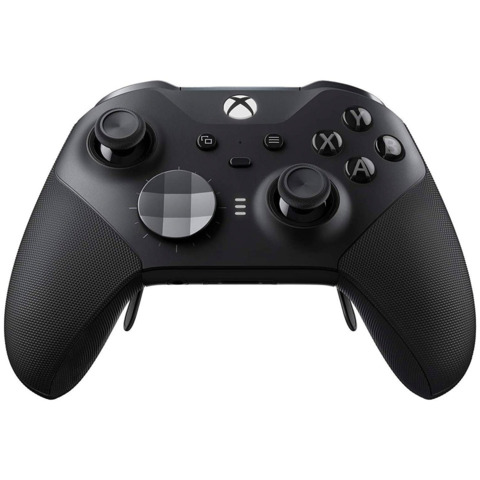
The Xbox Elite Series 2 controller is still our pick for the best Xbox controller, with full compatibility for the Xbox Series X|S as well as Xbox One. This Elite-style controller is the ultimate gamepad for Xbox owners. It features a wrap-around textured grip, refined trigger stops, and adjustable thumbstick tension as well as the ability to save up to three custom profiles (with one default profile) and switch between them on the fly. The Elite Series 2 also comes with four different types of thumbsticks, two types of paddles, and two types of D-pads to customize how your controller feels, and you can configure different button inputs by assigning one button to act as a Shift key, enabling alternative inputs for each of the other buttons. While the standard Xbox controller runs on AA batteries, the Elite Series 2 comes with a rechargeable battery that gets you up to 40 hours of gameplay, with an included carrying case and charging dock. Note that it doesn’t have a dedicated Share button like the new Xbox Wireless Controller.
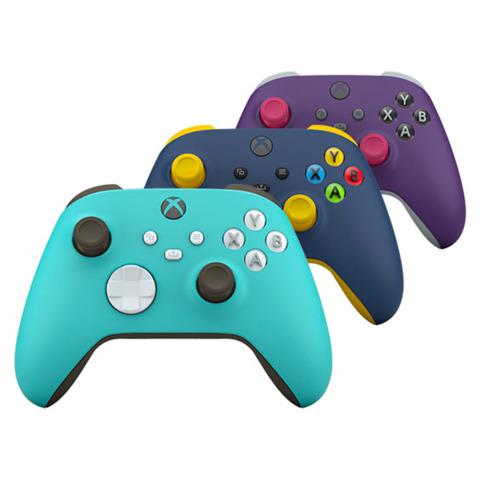
The upgraded Xbox Wireless Controller is a great pickup for those who don’t want to spring for the Elite Series 2 or don’t feel like they need the extra bells and whistles that come with that pad. Released alongside the Xbox Series X|S (but still compatible with Xbox One), the Xbox Wireless Controller features a hybrid D-pad, custom button mapping, a dedicated Share button, and a textured grip on the triggers, bumpers, and back case. The Xbox Wireless Controller is also compatible with Windows 10 PCs, Android phones, and tablets, making it a great option for using with Xbox Cloud Gaming as well. Microsoft has released the Xbox Wireless Controller in several shades already, from the standard black and white options to striking colors like Pulse Red, Shock Blue, and Electric Volt. Another plus is that you can design your own color scheme for the Xbox Wireless Controller with the Xbox Design Lab, letting you customize colors on the body, bumpers, triggers, thumbsticks, and more, with the option to engrave a personalized message for $10.
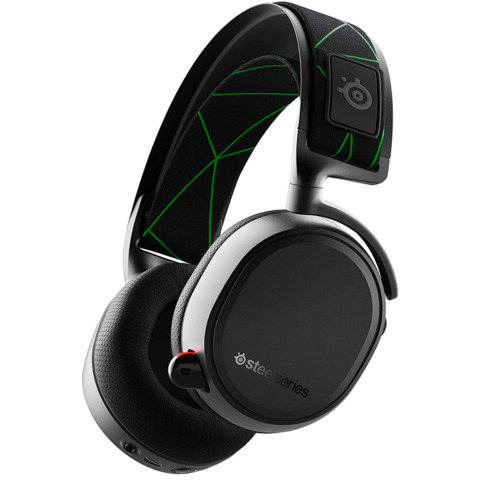
The SteelSeries Arctis 9X is the best gaming headset for Xbox, with compatibility for Xbox Series X|S, Xbox One, PC (with the Windows 10 adapter), and mobile via Bluetooth. It has great audio quality, but its winning feature is its wireless connectivity–the Arctis 9X syncs with your Xbox just like a controller, and turning on the headset also turns on the console, with game and chat audio ready to go. The best part is that you can use this Xbox wireless connection while simultaneously connecting via Bluetooth to your phone to listen to music or podcasts or even chat with friends on Discord. It also boasts a 20-hour battery life, a retractable noise-canceling microphone, a durable steel headband, and comfortable ear cushions.
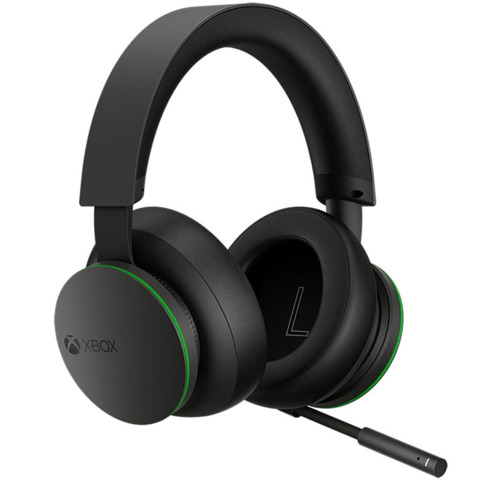
For a cheaper option, the new first-party Xbox Wireless Headset is another great headset pick at just $100. It also features the ability to connect to Xbox consoles wirelessly while also connecting via Bluetooth to other devices, and the design is lightweight, flexible, and sturdy. The audio quality is quite good as well, with support for spatial sound technologies like Dolby Atmos, Windows Sonic, and DTS Headphone:X. To adjust the volume and game/chat balance, you simply rotate the earcup dials, which makes on-the-fly adjustments quick and easy. The SteelSeries Arctis 9X still edges out the Xbox Wireless headset in terms of sound clarity, battery life, and durable build, but Microsoft’s Xbox Wireless Headset is a competitive option for half the price.
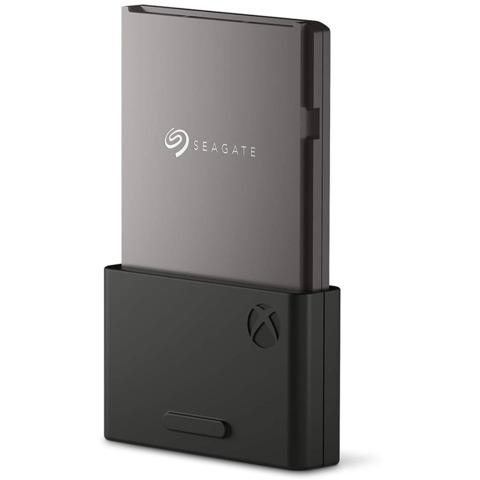
The Xbox Series X and S support expanded storage for playing next-gen games, but it requires a proprietary storage card from Seagate. The 1TB Seagate Storage Expansion Card was designed together with Xbox for playing next-gen Xbox Series X|S games directly from the expansion card without sacrificing load times, graphics, or performance, working identically to the internal SSD. It plugs right into the back of your console and will immediately be ready to use. And though it’s pricey at $220, this is comparable to the internal SSD expansion options announced for the PS5, with the 1TB Seagate FireCuda M.2 SSD costing $255.
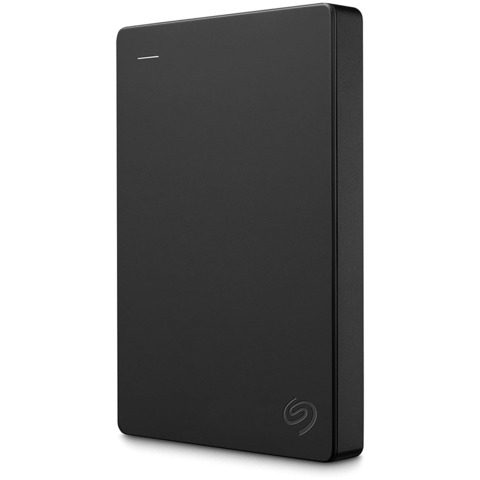
For Xbox One folks or those not looking to spend over $200 on Seagate’s Xbox Series X expansion card, the standard Seagate external hard drive is an excellent, reliable choice with over 140,000 reviews on Amazon. You won’t be able to play next-gen games off this drive directly, but you can store them on it to help free up space on the internal SSD; meanwhile, you can both store and play Xbox One games off it. Setting it up is as easy as plugging it into your console’s USB port with the included cable–Xbox should recognize the drive, and after a few clicks, you’ll be ready to go.
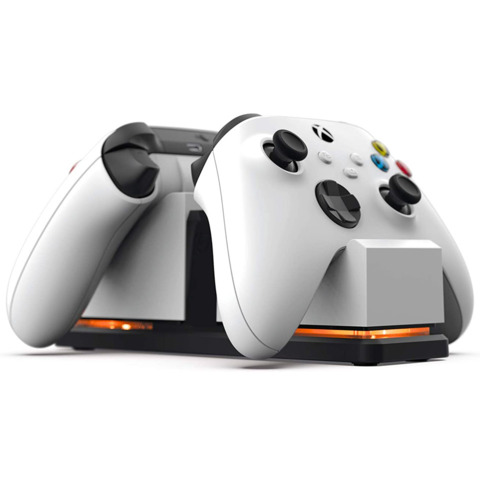
Though the batteries last a long time, it can still be frustrating having to swap in new AA batteries when your Xbox Wireless Controller finally runs out of juice, and investing in a rechargeable pair is a good idea. PowerA’s officially licensed Dual Charging Station comes with two rechargeable batteries (one per controller) and a charging station you can slide your controller into when it needs to charge. The charging station has a color-change LED indicator to indicate when your controllers are charging or ready to go, and it’s powered by an AC adapter so you don’t need to use a USB port. Both Xbox Series X|S and Xbox One controllers are compatible as well.
The station is available in black or white, and you can even buy a single stand for $20 if you’re certain you’ll never buy a second controller. For those just looking for some rechargeable batteries who don’t need the stand, the batteries are available on their own for $12.
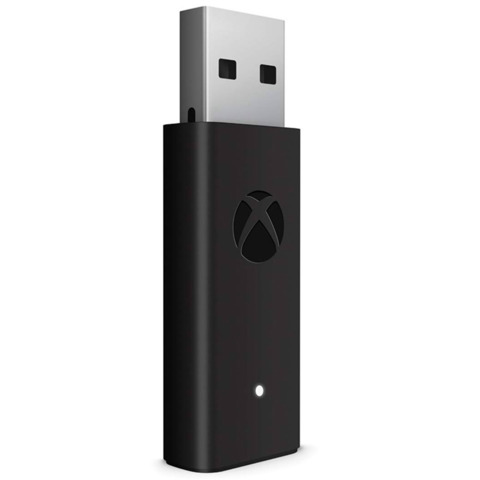
The official Xbox Wireless Adapter lets you connect your Xbox Wireless Controller to Windows 10 PCs, laptops, and tablets with up to eight controllers supported at once. If you want to use your Xbox Wireless Controller for playing PC games, this $25 device makes that really easy, especially if you make regular use of Xbox Game Pass for PC.
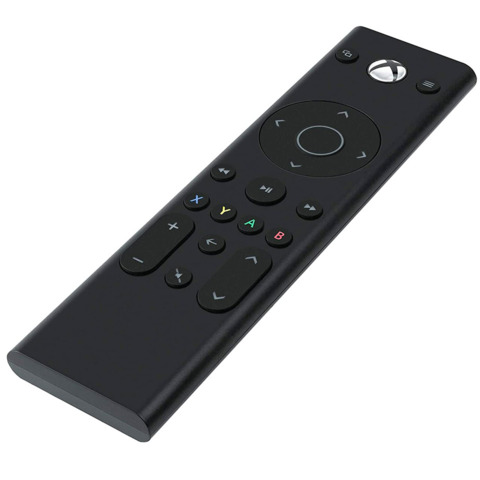
For those who use their Xbox as a movie and TV streaming machine in addition to playing games, a good media remote is a cheap and worthwhile purchase. The officially licensed PDP remote lets you easily navigate the Xbox Series X|S and Xbox One menus with dedicated media playback buttons in addition to the standard A/B/X/Y Xbox controls. It also has motion-activated backlit buttons so you can see what you’re doing, even in the dark. The main downside is this doesn’t have quick-access buttons for specific platforms like Netflix and YouTube, but it’s still a great option for streaming movies and TV on Xbox.
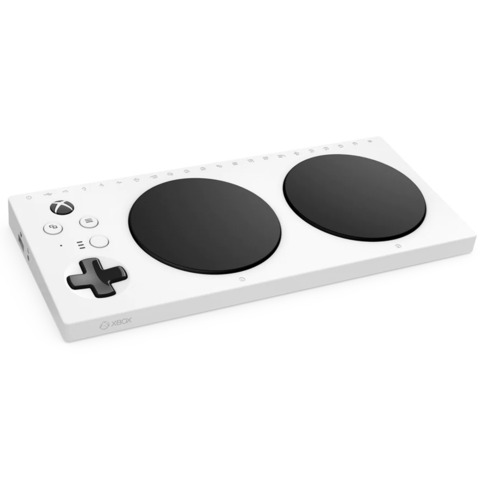
The Xbox Adaptive Controller was designed for gamers with limited mobility with input from organizations like AbleGamers, The Cerebral Palsy Foundation, and more, making it one of the most important Xbox accessories in terms of broadening accessibility. Essentially a hub for external devices such as joysticks, switches, buttons, and mounts (sold separately), the Xbox Adaptive Controller has 19 3.5mm ports and two USB 2.0 ports for external inputs and one 3.5mm jack for a headset as well. Further customization is available with the Xbox Accessories app, along with custom profiles you can easily switch between with the built-in Profile button. It’s compatible with Xbox Series X|S, Xbox One, and Windows 10 PCs.
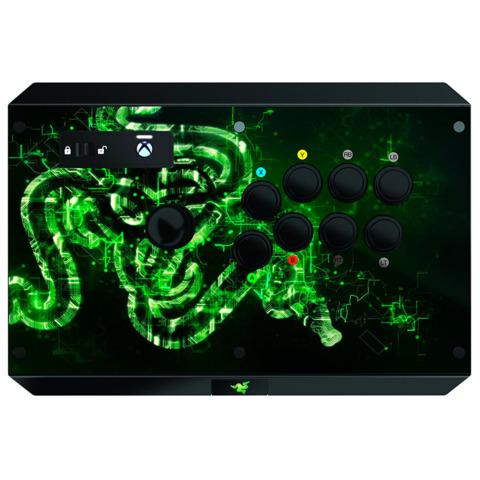
Though the original Razer Atrox released for Xbox 360, the newer model was designed for Xbox One with compatibility for Xbox Series X|S as well. The Razer Atrox features premium Sanwa parts, an excellent eight-way joystick, and great buttons that are satisfying to tap combos on. It’s also highly moddable, letting you easily pop it open to interchange the top platform with other designs or swap out the joystick and buttons. The USB cable is removable and easily stored inside the fight stick’s compartment.
A couple of downsides: There is no official PC support for the Razer Atrox, and there’s no right stick control or L3/R3 button inputs, which aren’t commonly needed in fighting games but occasionally necessary for things like character customization, meaning you’d have to switch to a regular controller for those (Razer’s Panthera Evo PS4 stick, alternatively, does support these inputs). Still, the Razer Atrox is overall a great Xbox fight stick that we’ve been happy using for games like Dragon Ball FighterZ, Street Fighter 30th Anniversary Collection, and Tekken 7.
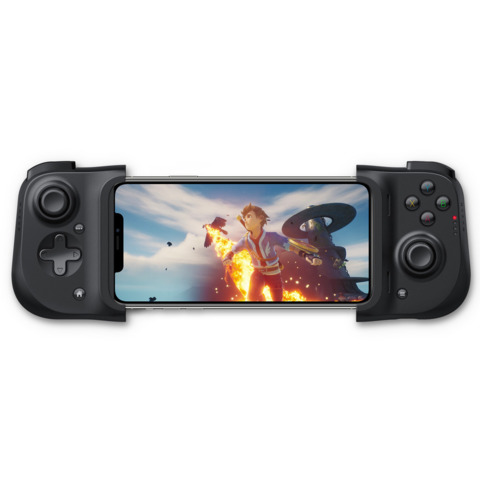
Though there are now quite a few great phone controllers on the market, the Razer Kishi was one of the first to do it well, and it’s still one of the best options for streaming games with Xbox Cloud Gaming while you’re on the go. The Razer Kishi doesn’t connect via Bluetooth; instead, it plugs directly into your phone’s USB-C port (or Lightning port on iOS) and runs off your phone’s own battery with a low-latency connection for gaming. The Kishi has probably the widest compatibility of any mobile controller so far, from the Samsung Galaxy to the Google Pixel and iPhone–you can check the Kishi compatibility list at Razer to make sure yours is on it. With the Kishi, you get a much more comfortable and ergonomic grip for playing games on your phone, and it works great not only for Xbox Cloud Gaming but also Stadia, GeForce Now, and other services.
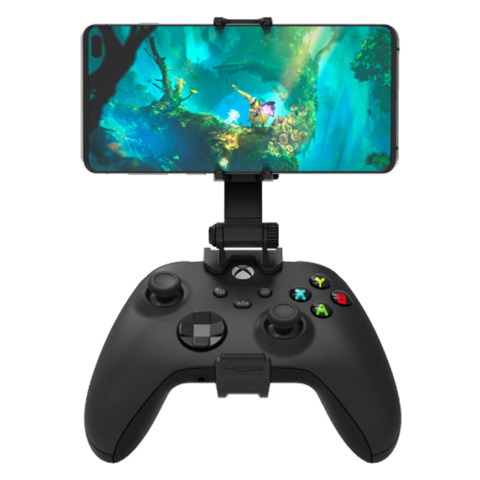
The Xbox Wireless Controller is arguably the best controller to use for Xbox Cloud Gaming because all of the games were designed with that gamepad in mind, but using it with your phone while you’re on the go can be awkward without a good clip. PowerA’s MOGA mobile gaming clip is officially licensed for Xbox and was designed with xCloud in mind, letting you easily clip your phone to your controller for Bluetooth gaming. The clip has two dials that allow for up to 220 degrees of articulation, letting you find the exact viewing angle you need, and a rubberized grip ensures your phone is held securely. Both the older Xbox One and new Xbox Series X|S controllers will work with this, and it fits most phones with a max width of 3.12 inches.
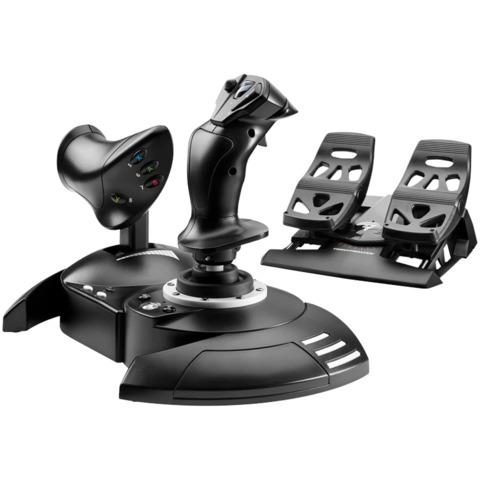
Microsoft Flight Simulator just released on Xbox Series X|S, and if you’re looking to significantly improve the experience on consoles, you’ll want a good flight stick and set of rudder pedals. Fortunately, Thrustmaster has a new kit available directly from the Microsoft Store that gets you the T.Flight HOTAS One joystick with the accompanying set of rudder pedals–this plug-and-play flight system will be recognized and configured by your Xbox Series X, Series S, or Xbox One as soon as you plug it in, so you don’t have to worry about compatibility. The T.Flight HOTAS One joystick features a detachable throttle with all the basic flight stick inputs you need for an immersive in-game flight, while the pedals give you precise control over the rudders and brakes with industrial-grade slide rails for smooth control.
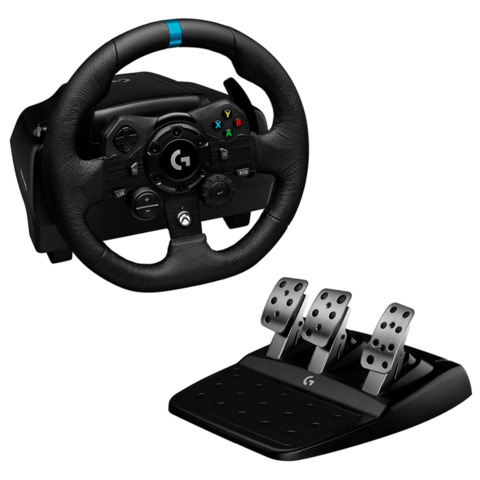
Logitech released the G923 racing wheel alongside the next-gen consoles last year, and the Xbox version remains a great choice for racing fans on Xbox Series X|S, Xbox One, or PC. The G923 has actual Xbox buttons and a D-pad on the front to make navigating menus easy. It also features a programmable dual clutch to help you get off the starting line faster with minimum smoke, a 24-point selector, and a progressive brake pedal to simulate a pressure-sensitive system. Logitech TrueForce technology delivers high-definition force feedback to make racing games feel even more realistic, though right now the number of support games is small: Grid, Assetto Corsa Competizione, iRacing, Gran Turismo Sport, Showrunner, and Dirt Rally 2.0. Like the Thrustmaster flight stick, the G923 racing wheel is an accessory for enthusiasts specifically as it’ll cost you a hefty dollar, but if racing games are your bread and butter, the investment is more than worth it.
Bob Odenkirk has thanked his fans for the outpouring of support following an incident that left him hospitalized this week. In the course of his thanks, he also revealed that he had a mild heart attack, but that doctors were able to resolve it without surgery.
“Hi. It’s Bob. Thank you. To my family and friends who have surrounded me this week,” Odenkirk said on Twitter. “And for the outpouring of love from everyone who expressed concern and care for me. It’s overwhelming. But I feel the love and it means so much.
“I had a small heart attack. But I’m going to be ok thanks to Rosa Estrada and the doctors who knew how to fix the blockage without surgery. Also, AMC and SONYs support and help throughout this has been next-level. I’m going to take a beat to recover but I’ll be back soon.”
The tweets confirm the nature of the medical emergency that resulted in the Better Call Saul actor being rushed to the hospital. Odenkirk collapsed during a filming of Better Call Saul, and representatives later stated he was in stable condition for a “heart-related incident.” His son, Nate Odenkirk, took to Twitter to assure fans he was going to be okay.
Hi. It’s Bob. Thank you. To my family and friends who have surrounded me this week. And for the outpouring of love from everyone who expressed concern and care for me. It’s overwhelming. But I feel the love and it means so much.
The statement also references AMC and Sony. He mentions that he plans a brief recovery period as well, which may include shuffling the shooting schedule for the final season of Better Call Saul, which is currently in production.
Odenkirk plays the title character Jimmy McGill, aka “Saul Goodman,” in the spin-off of the AMC show Breaking Bad. The 13-episode sixth and final season is currently slated to release in early 2022.
The Pokemon Company is distributing another free item for Pokemon Sword and Shield. During the Pokemon Players Cup IV Global Finals, the company shared a download code for a free Beast Ball (via Serebii). The code is only valid until August 2, however, so you need to act quickly if you want to claim the freebie.
Beast Balls are a rare type of Poke Ball that are particularly effective at catching Ultra Beasts, which you can encounter through Dynamax Adventures in the Crown Tundra. To claim your free Beast Ball, fire up your copy of Sword or Shield and follow these steps:
Click To Unmute
Size:
Want us to remember this setting for all your devices?
Now Playing: Pokémon Unite – Cinderace MVP Gameplay
Open Mystery Gift
Select Get with a Code/Password
Follow the prompts to connect online
Input the code PC4F1NALSBEAST
The Pokemon Players Cup IV Global Finals are underway this weekend and feature dedicated competitions for the Pokemon video game series, TCG, and Pokken Tournament DX. Each competition is being streamed on Pokemon’s Twitch and YouTube channels. You can read more about the event on the Pokemon website.
2021 marks the 25th anniversary of the Pokemon franchise, and The Pokemon Company has been celebrating with a number of events, including music collaborations with artists like Katy Perry and Post Malone. A handful of new Pokemon games have also released this year, including New Pokemon Snap and Pokemon Unite. The former is receiving a free update on August 3 that adds three new areas and 20 additional Pokemon to photograph, while the latter recently introduced its first new playable Pokemon, Gardevoir.