Following the release of The Great Ace Attorney Chronicles, Capcom is asking players to give their opinions on the series – and specifically asking if they want brand new games in the series.
The aptly titled The Great Ace Attorney Chronicles User Survey, which Capcom added to its website, asks players to give their detailed opinions on virtually every part of the game you can imagine. Capcom would like to know if you had high expectations for the game before purchase, where you purchased your copy from, what progress you’ve made with the game so far, and, most cricually, whether or not you’d buy a future Ace Attorney game if it were to be made.
Following this, players can also give their opinions on a list of further topics linked to The Great Ace Attorney Chronicles including voice acting, story, sound effects, background artwork, game controls, and more. Capcom has even prepared for the possibility that you might not have bought their latest title when filling out the survey. Opting to tell them that you don’t own The Great Ace Attorney Chronicles and have no plans on purchasing it in the future grants you access to a range of follow-up questions. These questions prompt you to tell Capcom what consoles/platforms you currently own to play games, which genre of games you prefer, and how many titles you have bought in the past year.
It’s safe to say this is one of the more thorough user surveys we’ve seen in a while. If you do manage to get to the end of the mammoth survey, then Capcom will reward you with an “original digital wallpaper” to say thanks for completing it.
A recent Animal Crossing: New Horizons datamine suggests that The Roost Cafe (and hopefully Brewster), one of the community’s most-requested features, could still arrive in the game during a future update. Needless to say, the fans are very excited.
Originally reported by Animal Crossing World, the version 1.11 patch for Animal Crossing: New Horizons contains some tweaks to lines of code that could suggest the addition of the cafe sooner rather than later.
According to the article, dataminers found code relating to a camera parameter change referenced as ‘IdrMuseumCafe’ back in version 1.10. However, additional lines of code have now seemingly been spotted reading ‘IdrMuseumEnt03’. Whilst not confirmed, this sounds like it likely relates to a third entrance to the Museum, which you could hope would lead into The Roost.
Elsewhere in the article, reports suggest that dataminers found the code reference ‘cNpcMemory:TalkProgressMuseumBuiltCafe’. Whilst it is again unclear as to exactly what this line of code means, it does contain the phrases NPC and MuseumBuiltCafe which are enough to give usome hope that we’ll be able to build a cafe into our museum.
The Roost cafe manager, Brewster, first made his appearance in Animal Crossing Wild World and has been a fan favourite within the Animal Crossing community ever since. While Animal Crossing: New Leaf made The Roost its own building, it’s usually been found attached to Blathers’ museum.
Rumblings of Brewster’s speculative return were not missed by fans across social media. The Animal Crossing Reddit page accurately summed up excitement levels right now with this simple but effective post:
The data additions come hot on the heels of Nintendo telling fans that it won’t stop updating the game anytime soon, which has led many to hope for some more meaningful changes to the game. Of course, as with all datamines, new code doesn’t necessarily mean new content – it could be putting ideas in place just in case Nintendo decides to add updates at a later date.
Over on Twitter, Brewster’s absence from Animal Crossing: New Horizons has been sorely noted. Whilst many fans are calling for the return of the Roost, one particular fan going by the username @iwantbrewster claims that they have taken to fully boycotting Animal Crossing: New Horizons until the barista is reunited with his adoring fans. Let’s hope it’s not too long before that boycott can be lifted.
it has been 355 days since i started boycotting acnh until brewster is added.
If you’re currently playing through Animal Crossing: New Horizons, why not check out our dedicated New Horizons wiki which contains a range of tips, tricks, and guides.
[poilib element=”accentDivider”]
Jared Moore is a freelance writer for IGN. You can follow him on Twitter.
After addressing several technical issues, Valheim developer Iron Gate Studio has provided an update on the upcoming Hearth & Home expansion that will be available in Q3 2021. Originally delayed so that technical issues in the game could be fixed, the team explained that Hearth & Home content is still on track for a release in the current quarter.
“We’re still on track to deliver the update this very quarter, and as always, thank you for your kindness and patience,” the team wrote on Valheim‘s Steam store page. “Your response to our roadmap post in June was super supportive, and the questions that came through in the Reddit AMA gave us lots of inspiration for future updates.”
Click To Unmute
Size:
Want us to remember this setting for all your devices?
Now Playing: The Valheim Viking Guide For Beginners
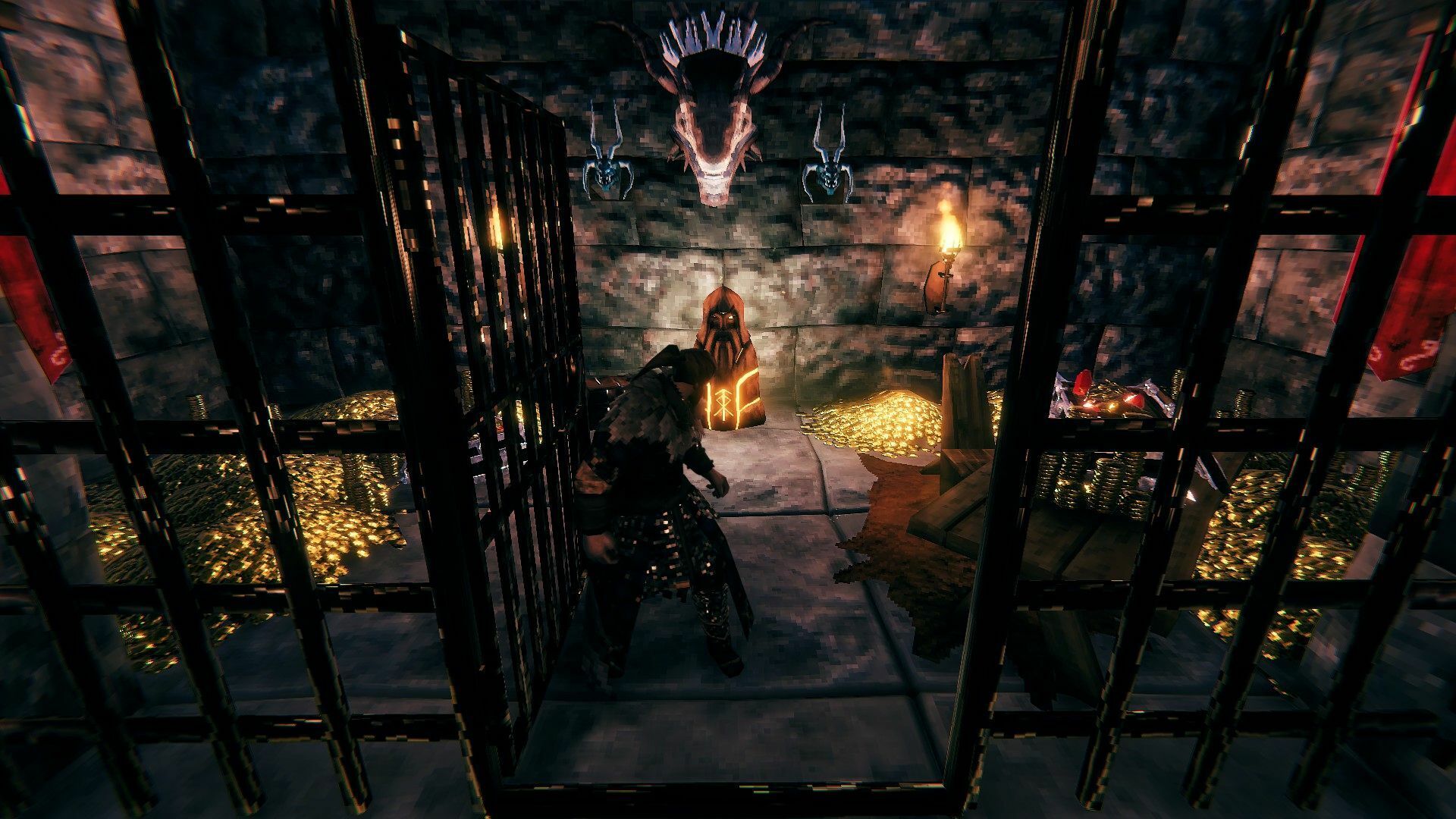
Iron Gate provided a sneak peek at what the new content will look like with a small haul of loot kept securely hoarded away.
Valheim’s Hearth & Home contentNow with dragon security
The team also announced that it’s expanding next month, adding a new programmer, animator, and a QA Manager to its staff. After Hearth & Home arrives, Iron Gate Studio will move on to focus on the big Mistlands update and the production of smaller Valheim patches. Some of those fixes arrived last month, as a new update addressed a save bug issue that was erasing entire worlds and characters.
Valheim has been one of the biggest success stories of 2021 so far, as the popular Norse multiplayer game has sold 6.8 million copies as of March 31, an impressive feat considering that the game is currently only available on PC.
Marvel Studios has shared a new poster and a behind-the-scenes featurette for Shang-Chi and the Legend of the Ten Rings.
The brand new featurette really packs a punch, with action-packed clips from the upcoming movie spliced together with insights from producer Kevin Feige, stars Simu Liu and Awkwafina, and director Destin Daniel Cretton about Shang-Chi’s backstory and his connection to the Ten Rings organization. You can watch the two-minute video below:
“We’re going back to the very beginning of the MCU. We have a keystone event. And that event is Tony Stark becoming Iron Man,” Feige explains in the video, referencing Stark’s involvement with the Ten Rings organization. They were the ones who kidnapped Stark in 2008’s Iron Man and forced him to build advanced weapons of mass destruction for them.
Shang-Chi’s backstory will revolve around the discovery that his father is the mysterious and powerful Mandarin aka Wenwu, the leader of the Ten Rings. As explained in the featurette, Shang-Chi will be brought back into his father’s world and will have to deal with coming face to face with him again. Both are pictured in Marvel’s new poster for the movie, below:
Shang-Chi and the Legend of the Ten Rings stars Simu Liu as Shang-Chi, who must confront the past he thought he left behind when he is drawn into the Ten Rings organization. The film also stars Tony Leung as Wenwu, Awkwafina as Shang-Chi’s friend Katy, and Michelle Yeoh as Jiang Nan, as well as Fala Chen, Meng’er Zhang, Florian Munteanu, and Ronny Chieng.
I admittedly have a soft spot in my heart for gaming laptops with OLED displays. That feeling hasn’t changed after spending the last few weeks testing the Gigabyte Aero 15 OLED XD, which also happens to come with Intel’s latest 11th generation H-Series processor and an RTX 3070.
Gigabyte is marketing the Aero 15 as a powerful laptop for creatives, and while that’s a true statement, it’s also a fully capable and portable gaming laptop.
After using the Aero 15 XD, I can confidently say that it excels at both of those workflows, making it a solid option for someone who wants a work laptop during the day and a gaming laptop at night.
Specs
Here are the specifications of the Gigabyte Aero 15 OLED XD I’ve been testing:
Model: Gigabyte Aero 15 OLED XD (RP75)
Display: 15.6-inch UHD (3840 x 2160)
Processor: 11th Gen Intel Core i7-11800H (24M cache, 4.6GHz Max Turbo)
Graphics: Nvidia GeForce RTX 3070 GPU with 8GB GDDR6
Memory: 32GB DDR4 3200MHz
OS: Windows 10 Pro
Storage: 1TB PCIe 4 SSD
Webcam: 720p
Ports: 3 x USB 3.2 Gen 1, 1 x Thunderbolt 4 USB-C, 1 x HDMI 2.0, 1 x miniDisplayPort 1.4, 1 x 3.5mm audio jack, 1 x UHS-II SD Card Reader, 1 x Ethernet
My favorite aspect of the Aero 15 is the display. Not only because it’s a 4K OLED panel, but because the bezels surrounding the display on three sides are impressively slim. Gigabyte puts the bezels on either vertical side and along the top of the screen at 3mm. At that size, there’s effectively no border around the display and it looks great.
The 15.6-inch 4K OLED panel looks stunning as well. Thanks to the increased sharpness, I was able to see some of the more subtle details on the guns in Warzone and grew to appreciate the colors and design of various maps in Knockout City.
Because the bezel along the top of the screen is too small for a webcam, Gigabyte moved it to the bottom deck of the laptop, just above the keyboard. If you weren’t looking for it, you might actually miss it. There’s also a sliding cover that blocks the camera when it’s not in use. And odds are you won’t use it very often. Not only does the positioning make for an awkward angle, but the quality is just not great overall. It’s very grainy.
The all-black housing is broken up by an Aero logo that lights up on the lid, with a carbon fiber-like pattern near the bottom, closer to the hinges. The design doesn’t provide any sort of benefit, other than it breaks up an otherwise bland exterior.
The keyboard includes a number pad, a design choice I have mixed feelings about. Normally I don’t mind a full keyboard and num pad combo. But normally there’s some space on the left edge of the laptop to rest my palm, especially when gaming. But with the Aero 15, when positioned on the WASD keys, the edge of my left palm lacked a comfortable spot to rest on the laptop.
Between the thin display bezels and the number pad, there’s just no need for a larger housing. However, if Gigabyte were to remove the number pad and center the keyboard on the deck instead, I wouldn’t have felt like I was trying to balance my hand on a tightrope all the time.
Other than that, I liked this keyboard. The chiclet-style keys are individually backlit with RGB colors that you can set and control in Gigabyte’s Control Center app.
The touchpad is centered with the main keyboard, not including the number pad, and has a fingerprint reader in the top-left corner. The reader is fast and easy to use after setup. Open the Aero 15’s lid, touch the sensor, and a split second later the laptop is unlocked.
The power button is found just above the keyboard, centered with the housing and surrounded by a decorative pattern that enables airflow for cooling.
There are two downward-facing speakers on the Aero 15, each one found in the front corners on the bottom of the laptop.
You’ll find a respectable number of ports flanking either side of the laptop. On the right side are two USB 3.2 Gen 1 ports, a Thunderbolt 4 port for high-speed data transfers (up to 40Gbps) or external monitors, and it will let you connect any USB-C device to the Aero 15. There’s also an SD Card reader, and then the charging port.
On the left side is an Ethernet jack, audio jack, USB 3.2 Gen 1 port, miniDisplayPort, and HDMI 2.1 port. I would like to have had a USB-C port on both sides of the laptop, just for ease of access, but the number of ports available on this machine should be more than enough to plug in your accessories and peripherals without having to buy a hub right away.
In total, the Aero 15 OLED XD measures 14 x 9.8 x 0.78-inches and weighs 4.4-pounds. To be honest, I’m surprised it weighs that much. It looks and feels very light when carrying it around the house.
All in all, the Aero 15 OLED XD’s design doesn’t break any molds or raise eyebrows, but that’s not necessarily a bad thing.
Gigabyte Aero 15 OLED XD – Performance and Gaming
Out of the box, the Aero 15 OLED’s GPU driver was set to the Studio driver, which makes sense because Gigabyte is advertising the Aero 15 as a device for creatives.
You can quickly switch to the Game Ready Driver with a few clicks in the GeForce Experience app, which is what I did after getting the Aero 15 setup and ready to test.
Inside the test unit I received is an Intel i7-11800H H-series processor, an RTX 3070 Laptop GPU (the new term for Max-Q tuned mobile GPUs), 32GB of DDR4 3200 Mhz memory, and a 1TB M.2 PCIe 4 SSD.
PCIe 4 and Thunderbolt 4 support come courtesy of Intel’s H-Series processor, and regardless if you’re a gamer or creative user, bring beneficial features to mobile devices, or in this case the Aero 15 OLED XD.
I’ve had an extended amount of time to test and use the Aero 15 OLED, and it’s fast. I’m able to multitask with multiple tabs in Edge, stream Spotify, manage Slack interactions and even mess around with basic photo or video editing and never once did I feel like the Aero 15 OLED was getting bogged down.
Benchmarks show a similar story.
When looking at these comparisons, it’s clear the Aero 15 OLED XD can mostly keep pace with the MSI GP66 Leopard and the Gigabyte Aorus 15G XC. It performed roughly 10-percent lower than the MSI GP66 Leopard on almost all tests and matched the Aorus 15G under the same tests.
As for gaming, outside of the issue of where to put my left hand while playing, I had a good time testing this laptop. I’ve been trying my hand at Knockout City after it was added to the Xbox Game Pass recently. I monitored the performance with every setting maxed out and playing at 4K resolution, and I was seeing on average 120 frames per second.
I monitored performance in Warzone as well, both with 4K turned on and turned off. With all graphics settings maxed out, the game gave me a warning about going over the “safe” VRAM level. The warning said I could experience dropped frames or tearing if I left all settings as they were. I played a couple of matches to see what would happen, and the warning was accurate. I did experience sporadic dropped frames and tearing throughout the matches. However, once I lowered graphics quality one level and was back under the VRAM limit, all of those issues went away.
The Aero 15 OLED XD averaged 51 frames per second when playing Warzone in 4K (I was not mad at the experience at all). When dropping down to 1080p and all settings returned back to high, I was not only under the VRAM limit, but performance saw a pretty big jump. Going from an average of 51 to 88 frames per second.
One downside to the glossy display panel is that I had to be really conscious of where I played. If I sat in the wrong spot in my office, the glare of the overhead lights was distracting and annoying. It’s not a deal-breaker, but it’s something to keep in mind.
One downside to the Aero 15 OLED XD is its battery life, at least when it comes to using it for work. I had high hopes for 4 or more hours of juice, but my dreams were quickly crushed after running PCMark 10’s battery benchmark. The Aero 15 lasted 2 hours and 16 minutes, or just enough to answer your emails, browse Reddit, and maybe order something on Amazon.
For a gaming laptop, that sort of battery life is expected. For example, the MSI GP66 Leopard powered through 2 hours and 20 minutes. Heck, even Gigabyte’s own Aorus 15G XC with similar specs lasted 4 hours and 41 minutes.
With the Aero 15 marketed as a laptop for creatives, it’s disappointing the battery didn’t at least match the Aorus 15G.
Gigabyte Aero 15 OLED XD – Software
There isn’t a whole lot of extra software installed on the Aero 15 out of the box. Nvidia Broadcast is installed, which should help you sound crisp and look clear on video calls or when streaming.
Gigabyte has pre-installed its own Smart USB Backup app and the Gigabyte Control Center app is also present. The former app creates a bootable USB drive should you need to reset the laptop, while the latter is what you’ll use to adjust the RGB backlit keys, switch between different profiles for work and gaming, and control other system settings like charging policy, fans, or even update drivers.
That said, when using Control Center to update drivers, it kept installing an older version of the RTX 3070’s driver, so I eventually gave up on using it.
August 2021 for Amazon Prime Video means a wide selection of new Amazon Originals like Jolt, the revenge-filled action-thriller starring Kate Beckinsale, Annette, a film that not only stars Adam Driver and Marion Cotillard but also was the opening film at the 2021 Cannes Film Festival, and a documentary focused on Val Kilmer called Val.
Anime fans will also be treated to Evangelion: 3.0+1.01 Thrice Upon a Time, the fourth and final installment of Hideaki Anno’s post-apocalyptic anime franchise. There will also be a ton of classic films joining Amazon Prime Video next month, including Jaws, Hook, Fast Times at Ridgemont High, and much more.
To celebrate the time of year where kids are getting ready to go back to school, Amazon Prime Video subscribers can also enjoy Pete the Cat Back to School Operetta, a sing-a-long adventure that will have kids and parents laughing and smiling together!
Check out the slideshow gallery below for a spotlight of some of the most notable August 2021 Amazon Prime Video releases followed by the full list:
The products discussed here were independently chosen by our editors. GameSpot may get a share of the revenue if you buy anything featured on our site.
A trio of excellent Razer gaming mice are featured in Best Buy’s daily deals.
If you’re in the market to upgrade your PC gaming setup, Best Buy has some great deals on gaming mice from one of the best peripheral manufacturers. Three Razer gaming mice are on sale for steeply discounted prices, including the Razer DeathAdder V2 Pro, our pick for the best gaming mouse. You’ll have to hurry if you want to take advantage of these prices, as these discounts are part of Best Buy’s daily deals and end tonight at 10 PM PT / 1 AM ET.
Razer’s DeathAdder line has long been a staple in the PC gaming scene, and the DeathAdder V2 Pro is the best edition yet. This wireless mouse has a 20K DPI sensor with auto-calibration that helps mitigate drift and offers precise, fast cursor movement. The DeathAdder is a fairly large mouse with two big programmable buttons on the side. While it’s ideal for shooters, the V2 Pro isn’t the best choice for MMOs or games that require a lot of inputs. The DeathAdder V2 Pro has stellar battery life, lasting up to 70 hours on a single charge. Amazon is matching Best Buy’s deal on the DeathAdder V2 Pro.
The Razer Naga Pro is a more compact option with immense versatility. It includes three swappable side plates with different inputs. For those playing MMOs, the 12-button side plate is ideal, giving you more than enough programmable buttons at your fingertips. There are also configurations for a six-button and two-button schemes. Essentially, the Naga Pro can be customized to fit the game you’re playing. It also has a 20K DPI optical sensor and lasts for up to 100 hours on a full charge.
If you prefer wired mice and are shopping on a budget, the Razer Viper 8KHz is a solid choice. It has the added benefit of being an ambidextrous gaming mouse. The Viper has a pair of programmable buttons on each side and features Razer’s HyperPolling technology to offer lightning fast speeds with its 20K DPI optical sensor.
Best Gaming & Tech Deals This Week
Got a news tip or want to contact us directly? Email [email protected]
I’m here again to extoll the virtues of buying certified refurbished tech from eBay. Right now, eBay is featuring Samsung phones, earbuds, and smartwatches in its certified refurbished program. If you want to get your hands on one of Samsung’s excellent mobile products, you can do so without paying full-price if you don’t mind refurb, and they’re being offered direct from the manufacturer.
If you’re unaware, all eBay certified refurbished products include a 2-year warranty and a 30-day money-back guarantee. On top of that, these Samsung Galaxy products are sold direct from Samsung. Lots of brands and retailers operate eBay stores. It’s where I buy like half my shoes.
Since they’re refurbished, that means they’re statistically less likely to fail than factory-new, but if you’re still worried about it, the warranty covers you for 2 years. It’s a really sweet deal, and a great way to score tech for way cheaper than you might otherwise. I recommend checking out the certified refurbished Apple MacBook deals if you haven’t already.
A new trailer for Life is Strange: True Colors gives us an introduction to Haven Springs, Colorado, a gorgeous mountain town where host Steph Gingrich tells us we’ll find “family” rather than mere friends.
Haven Springs’ aptly named Main St. features “all the action,” according to Gingrich. You’ll find a record shop, bike and ski shop, ice cream, flowers, and a townie bar called The Black Lantern. The bar not only features lots of locals to chat with but also some “classic” arcade game cabinets. An Arkanoid game is on display, as Taito is a Square Enix subsidiary now, and you can even play foosball or try out the jukebox.
If you’re into LARPing (live-action role-playing) and yelling “lightning bolt!” while throwing napkins at people, then you’ll be pleased to know Steph runs her own game with the locals, and she wants to get it up and running again for your visit. You’ll also be able to check out a spring festival featuring campfires and local music, which we’re guessing will include a sad Sufjan Stevens song if the past games are any indication.
While this introduction to Haven Springs is a pleasant and breezy one, Life is Strange: True Colors is going to be much darker when it comes to Xbox, PlayStation, Nintendo Switch, PC, and Stadia on September 10, and a remastered version of Life is Strange and Life is Strange 2 comes with the Ultimate Edition. Unlike the previous games, the entire “season” will release at once, and a prequel comic is out next month. Using protagonist Alex’s psychic abilities, you’ll investigate the truth behind her brother Gabe’s death. Hey, wait a minute!